- Mark as New
- Bookmark
- Subscribe
- Mute
- Subscribe to RSS Feed
- Permalink
- Report Inappropriate Content
08-27-2022 01:52 AM
Hello Experts,
I need help with below two scripts in servicenow
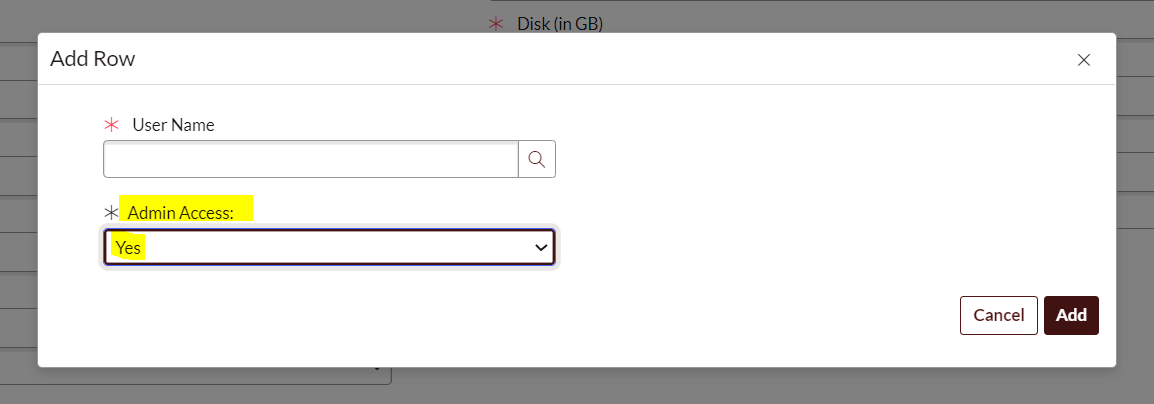
1. I have a multi select variable on catalog item form which shows below two values

So whenever the "Admin Access" i.e. var_mafv_admin_access_win value is Yes it should trigger approval to a user.
2. Also there is another Multi select variable set i.e. vs_mafv_vitc_new_server_nw_ports whenever any row is populated in this variable set it should trigger further approval

How do I get this value in If logic of workflow?
Solved! Go to Solution.
- Labels:
-
Service Catalog


- Mark as New
- Bookmark
- Subscribe
- Mute
- Subscribe to RSS Feed
- Permalink
- Report Inappropriate Content
08-28-2022 10:23 AM
update as this and also you should set yes and no and not Yes and No
answer = ifScript();
function ifScript() {
var ans = 'No';
var var_array = current.variables.var_mafv_win_user_list;
var rowCount = var_array.getRowCount();
for (var i = 0; i < rowCount; i++) {
var row = var_array.getRow(i);
if (row.var_mafv_admin_access_win == "Yes") {
ans = 'yes';
break;
}else {
ans = 'no';
}
}
return ans;
}
Regards
Ankur
Ankur
✨ Certified Technical Architect || ✨ 10x ServiceNow MVP || ✨ ServiceNow Community Leader

- Mark as New
- Bookmark
- Subscribe
- Mute
- Subscribe to RSS Feed
- Permalink
- Report Inappropriate Content
08-27-2022 03:37 AM
Hi,
Have a look at this article to get some pointer on how to script a MRVS.
- Mark as New
- Bookmark
- Subscribe
- Mute
- Subscribe to RSS Feed
- Permalink
- Report Inappropriate Content
08-28-2022 09:19 AM
I have written below script.
answer = ifScript();
function ifScript() {
var ans = 'No';
var var_array = current.variables.var_mafv_win_user_list;
workflow.info('value of MRVS=' + var_array);
var rowCount = var_array.getRowCount();
for (var i = 0; i < rowCount; i++) {
var row = var_array.getRow(i);
// if ((row.var_ad_security_group != "None") || (row.var_ad_security_group != "none") || (row.var_ad_security_group != "No_Specific_Report_Access_is_Required")) {
// if ((row.var_ad_security_group != "None")) {
if (row.var_mafv_admin_access_win == "Yes") {
ans = 'Yes';
}else {
ans = 'No';
}
}
return ans;
}
If single row is selected and admin value is yes or no the approval works fine.
But if multiple values are selected and only 1 value is Yes then also it should trigger approval.

For above condition it is skipping the approval is any of the value in No.
- Mark as New
- Bookmark
- Subscribe
- Mute
- Subscribe to RSS Feed
- Permalink
- Report Inappropriate Content
08-28-2022 10:23 AM
update as this and also you should set yes and no and not Yes and No
answer = ifScript();
function ifScript() {
var ans = 'No';
var var_array = current.variables.var_mafv_win_user_list;
var rowCount = var_array.getRowCount();
for (var i = 0; i < rowCount; i++) {
var row = var_array.getRow(i);
if (row.var_mafv_admin_access_win == "Yes") {
ans = 'yes';
break;
}else {
ans = 'no';
}
}
return ans;
}
Regards
Ankur
Ankur
✨ Certified Technical Architect || ✨ 10x ServiceNow MVP || ✨ ServiceNow Community Leader
- Mark as New
- Bookmark
- Subscribe
- Mute
- Subscribe to RSS Feed
- Permalink
- Report Inappropriate Content
08-28-2022 11:23 AM
Thank You very much Ankur.