
- Mark as New
- Bookmark
- Subscribe
- Mute
- Subscribe to RSS Feed
- Permalink
- Report Inappropriate Content
07-06-2022 06:04 AM
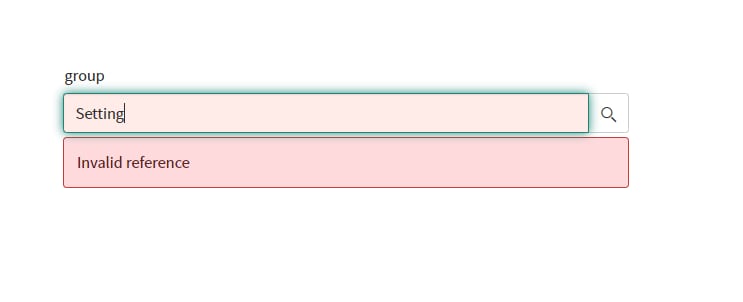
NOTE :- When I use " * " in reference field it is populate Results but for Without " * " its not . how can I get Same results without * , Thank you.


Approach 1 ) attribute in reference field
ref_auto_completer=AJAXTableCompleter,
ref_ac_columns=name,
ref_ac_columns_search=true
Approach 2) System Property
Disable the glide.ui.ref_ac.startswith system property.
added the property glide.ui.goto_use_contains and set the property value to true.
Solved! Go to Solution.

- Mark as New
- Bookmark
- Subscribe
- Mute
- Subscribe to RSS Feed
- Permalink
- Report Inappropriate Content
07-06-2022 06:18 AM
Hey,
1. Ensure that the system property "glide.ui.ref_ac.startswith" is set to false.
2. Confirm that the reference field has similar dictionary attributes as the following:
ref_ac_columns_search=true, ref_ac_order_by=column_name, ref_ac_columns=column_name1, column_name2, ref_auto_completer=AJAXTableCompleter
3. Create the following user preference:
Name: table_name_being_referenced.autocomplete.contains (i.e. sys_user.autocomplete.contains)
System: checked
User: leave this blank
Type: true | false
Value: true
4. After the user preference has been created log out and back into the instance for it to take effect
Feel free to mark correct, If I answered your query.
Will be helpful for future visitors looking for similar questions 🙂
Aman Kumar
- Mark as New
- Bookmark
- Subscribe
- Mute
- Subscribe to RSS Feed
- Permalink
- Report Inappropriate Content
07-06-2022 06:18 AM
This should give you what you need:
- Disable the glide.ui.ref_ac.startswith system property . See Improving Auto-Complete Queries.
- Navigate to User Administration > User Preferences.
- Select the preference "'<referenced table>.autocomplete.contains"'.
- Set the value field to true.
- Log out and log back in to immediately display the updated search.
- Mark as New
- Bookmark
- Subscribe
- Mute
- Subscribe to RSS Feed
- Permalink
- Report Inappropriate Content
07-08-2022 06:10 AM
Thanks a lot ,
- Mark as New
- Bookmark
- Subscribe
- Mute
- Subscribe to RSS Feed
- Permalink
- Report Inappropriate Content
07-06-2022 06:18 AM
Hey,
1. Ensure that the system property "glide.ui.ref_ac.startswith" is set to false.
2. Confirm that the reference field has similar dictionary attributes as the following:
ref_ac_columns_search=true, ref_ac_order_by=column_name, ref_ac_columns=column_name1, column_name2, ref_auto_completer=AJAXTableCompleter
3. Create the following user preference:
Name: table_name_being_referenced.autocomplete.contains (i.e. sys_user.autocomplete.contains)
System: checked
User: leave this blank
Type: true | false
Value: true
4. After the user preference has been created log out and back into the instance for it to take effect
Feel free to mark correct, If I answered your query.
Will be helpful for future visitors looking for similar questions 🙂
Aman Kumar
- Mark as New
- Bookmark
- Subscribe
- Mute
- Subscribe to RSS Feed
- Permalink
- Report Inappropriate Content
07-07-2022 06:45 AM
Thanks Aman ,its working for me.





.png)