How to hide display value in reference qualifier in portal?

- Mark as New
- Bookmark
- Subscribe
- Mute
- Subscribe to RSS Feed
- Permalink
- Report Inappropriate Content
01-14-2020 04:51 AM
Hello,
I need help with this below issue.
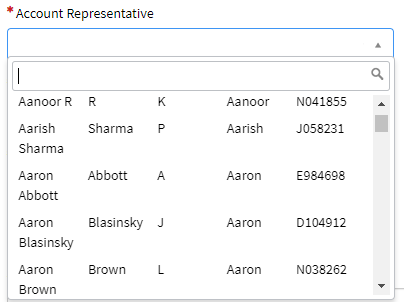
I have a field in a record producer which is a reference to User (sys_user) table. I want to show Last Name, Middle Name, First Name and Employee ID as an auto-completion options. But, along with this I want to hide the display column which is Name.
My Reference qualifier is: ref_auto_completer=AJAXTableCompleter,ref_ac_columns=last_name;middle_name;first_name;employee_number,ref_ac_display_value=false
But ref_ac_display_value attribute is not working in the portal. Is there a workaround to achieve this?
If it's not possible to hide display value, is there a way to search by Last name without adding it as a column in autocomplete and without adding * before?
Thanks,
Sapna
- Labels:
-
Service Portal

- Mark as New
- Bookmark
- Subscribe
- Mute
- Subscribe to RSS Feed
- Permalink
- Report Inappropriate Content
01-14-2020 05:20 AM
Hi,
You shall use the reference qualifiers to do the search on last name. Other than that, you need to add last name to ref_ac_columns and make ref_ac_columns_search=true to make it searchable.
Mark the comment as a correct answer and helpful if it helps.

- Mark as New
- Bookmark
- Subscribe
- Mute
- Subscribe to RSS Feed
- Permalink
- Report Inappropriate Content
01-14-2020 05:44 AM
The attribute ref_ac_display_value isn't supported within the Catalog variables from what I recall, only on form variables.
Adding the ref_ac_columns_search=true attribute will make the field searchable by first name, middle name, last name and employee number, but the display value will always be searched as well.
Michael D. Jones
Proud member of the GlideFast Consulting Team!