- Mark as New
- Bookmark
- Subscribe
- Mute
- Subscribe to RSS Feed
- Permalink
- Report Inappropriate Content
06-21-2025 03:13 PM
Hi everyone, how are you?!
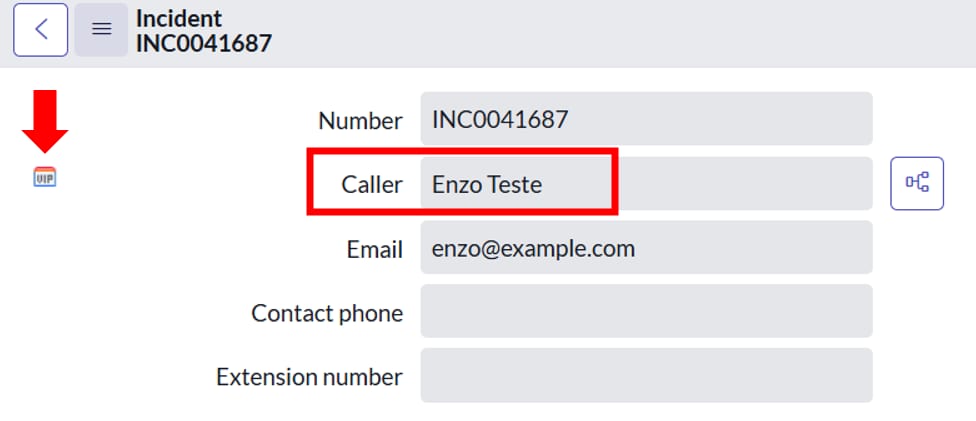
Every time a VIP user opens an INC, it must have the “VIP” icon and the font color “Red” (img1).
Note that I have already defined the user “Enzo” as VIP (img2), but when I access the Incident record, the font color is not Red (img3).
There is the option to right-click on the “Caller” field > Configure Styles (img4) (img4.1), but even defining “color: red” or “color: red !important” does not work.
Note: I tried using a Client Script (Incident table), but it does not work (img5)
Obs.: I also found this tip in the Community but it doesn't work:
Does anyone have any tips? please!
Thanks 😉
Solved! Go to Solution.


- Mark as New
- Bookmark
- Subscribe
- Mute
- Subscribe to RSS Feed
- Permalink
- Report Inappropriate Content
06-22-2025 03:41 AM
Hi @Elton2 check below script I try on pdi its working

- Mark as New
- Bookmark
- Subscribe
- Mute
- Subscribe to RSS Feed
- Permalink
- Report Inappropriate Content
06-22-2025 06:25 AM
Hi @Elton2
It appears to be an OOB feature where selecting a VIP user as the caller automatically changes the font color to red and displays the VIP logo in front of the field by default.
I recommend raising a HI ticket with the vendor.
Pic from fresh PDI.

Regards,
Siva
- Mark as New
- Bookmark
- Subscribe
- Mute
- Subscribe to RSS Feed
- Permalink
- Report Inappropriate Content
10-07-2025 12:38 PM
i have a two chice i can do 2 type of color on workspace first dot/cell color like we saw in incident table field priority critical 1 and high2 and 2nd choice is change background color .. i aaply field style but here it show only in list view i also need in asset workspace