- Mark as New
- Bookmark
- Subscribe
- Mute
- Subscribe to RSS Feed
- Permalink
- Report Inappropriate Content
08-30-2021 10:07 AM
Hi Guys,
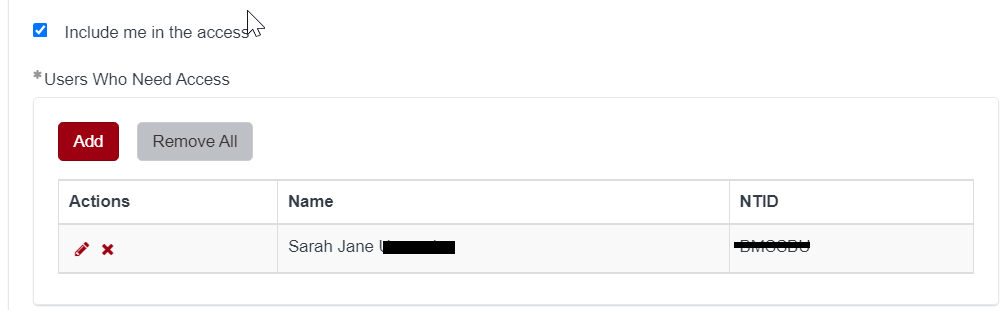
I have a Requested For variable (itsm_requested_by), a checkbox (include_me_in_the_access) and a mrvs (users_who_need_access). When I checked the checkbox it will add the Requested For to the mrvs, then when deselecting the checkbox it should be remove from the mvrs.

I came across from one of the question and was able to add the details in my mrvs by creating script include + client script (onChange)
Script Include:
var populateEmailfromList = Class.create();
populateEmailfromList .prototype = Object.extendsObject(AbstractAjaxProcessor, {
listcollector: function() {
var listValuename = [];
var userInfo = this.getParameter('sysparm_user_info');
var query = 'sys_idIN' + userInfo;
if(userInfo)
{
var gr = new GlideRecord('sys_user');
gr.addEncodedQuery(query);
gr.query();
if(gr.next()){
listValuename.push({
"name": gr.getUniqueValue('name'),
"ntid": gr.getValue('u_network_id')
});
}
}
gs.info('ARB JSON'+JSON.stringify(listValuename));
return JSON.stringify(listValuename);
},
type: 'populateEmailfromList '
});
OnChange Client Script:
function onChange(control, oldValue, newValue, isLoading) {
if (isLoading) {
return;
}
if(newValue == ''){
g_form.clearValue('users_who_need_access'); // give name of MRVS variable set here
}
if(oldValue != newValue){
var ga = new GlideAjax('populateEmailfromList');
ga.addParam('sysparm_name', 'listcollector');
ga.addParam('sysparm_user_info', g_form.getValue('itsm_requested_by')); // give here the requestor variable name
ga.getXML(listcolleValues);
}
function listcolleValues(response) {
var val = response.responseXML.documentElement.getAttribute("answer");
if (g_form.getValue('include_me_in_the_access') == 'true') {
g_form.setValue('users_who_need_access', val); // give name of MRVS variable set here
}
else if (g_form.getValue('include_me_in_the_access') == 'false'){
var toRemove = g_form.getDisplayValue('itsm_requested_by').value;
var finalArr = [];
var parser = JSON.parse(val);
for(var i=0;i<parser.length;i++){
var obj1 = parser[i];
var newParser = JSON.parse(JSON.stringify(obj1));
if(newParser.name != toRemove){
finalArr.push(obj1);
}
}
alert('new JSON' + JSON.stringify(finalArr));
g_form.setValue('users_who_need_access',JSON.stringify(finalArr));
}
}
}
Unfortunately, the "else if (g_form.getValue('include_me_in_the_access') == 'false'){" in my client script is not working for me. Please help me with my script.
Appreciate for any assistance.
thanks,
Sarah
Solved! Go to Solution.
- Labels:
-
Service Catalog


- Mark as New
- Bookmark
- Subscribe
- Mute
- Subscribe to RSS Feed
- Permalink
- Report Inappropriate Content
08-31-2021 07:23 AM
Hi,
you need to again perform GlideAjax when it is checked so that you get the user details and add it to existing json string
Regards
Ankur
Ankur
✨ Certified Technical Architect || ✨ 10x ServiceNow MVP || ✨ ServiceNow Community Leader
- Mark as New
- Bookmark
- Subscribe
- Mute
- Subscribe to RSS Feed
- Permalink
- Report Inappropriate Content
08-31-2021 07:23 AM
Hi,
you need to again perform GlideAjax when it is checked so that you get the user details and add it to existing json string
Regards
Ankur
Ankur
✨ Certified Technical Architect || ✨ 10x ServiceNow MVP || ✨ ServiceNow Community Leader
- Mark as New
- Bookmark
- Subscribe
- Mute
- Subscribe to RSS Feed
- Permalink
- Report Inappropriate Content
08-31-2021 09:16 AM
thank u.