- Mark as New
- Bookmark
- Subscribe
- Mute
- Subscribe to RSS Feed
- Permalink
- Report Inappropriate Content
08-21-2020 12:25 PM
Thought this was simple, apparently I'm wrong. Here's the script I'm using. It's supposed to take a string date, change it to a date time object, minus 3 days from it and return the finished product to set a sc_task date field. I have this in an Update Record action.
All it does is not allow my flow to save and return an error. "attempting to use undefined input = 'current' from Flow 1"
/*
**Access Flow/Action data using the fd_data object. Script must return a value.
**example: var shortDesc = fd_data.trigger.current.short_description;
**return shortDesc;
*/

var rollOnDate = fd_data.trigger.current.roll_on_date;
var dueDate = fd_data.trigger.current.due_date;
var gdt = new GlideDateTime(rollOnDate);
gdt.addDays(-3);
dueDate = gdt.getDate();

return dueDate;
Any help appreciated.
Solved! Go to Solution.
- Labels:
-
Service Catalog

- Mark as New
- Bookmark
- Subscribe
- Mute
- Subscribe to RSS Feed
- Permalink
- Report Inappropriate Content
08-22-2020 06:34 PM
It's basically the same what you are doing here. You are creating a separate action to populate the due date field which can be done inline in your flow with simple 3 lines of code like how i mentioned.
If you are using the inline Function in the flow to populate a specific field as shown below in picture then you should be using below to call the triggered variables
- fd_data.trigger.current.variables.roll_on_date, or maybe
- fd_data.trigger.current.variables.req_item.roll_on_date

If you are creating an action to use it in the flow, you have to define the inputs for the action and access them as inputs.variable_name from the script.
Cheers,
Arsh

- Mark as New
- Bookmark
- Subscribe
- Mute
- Subscribe to RSS Feed
- Permalink
- Report Inappropriate Content
08-21-2020 07:07 PM
Hi Eric,
could you please double check your roll on date field if it starts with u_ if it's a customized field?
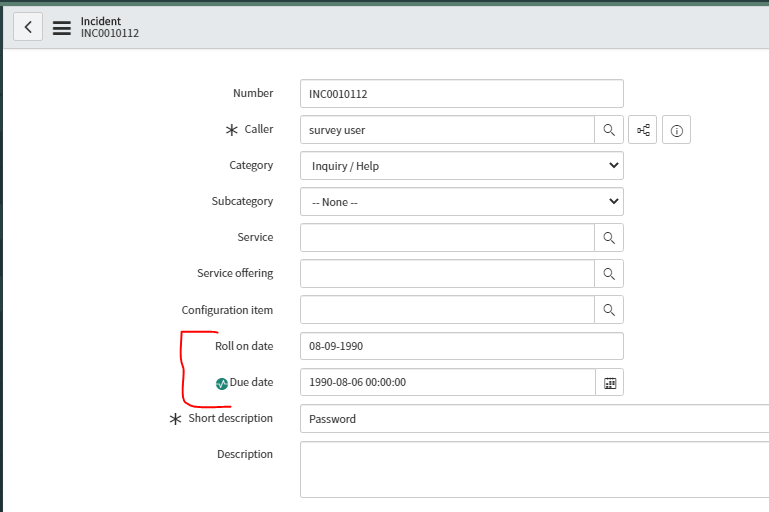
I tried the it on my instance and it's working fine. I've created roll on date field on an incident form and applied your logic in the flow designer - it saved and executed as expected. see below

And when i tested this flow on one of my incident bu giving a roll on date in string format as shown below - it executed the script and applied it to due date field as expected.

Also it might be worth double checking if your "roll on date" field is on the right table you are creating your flow designer for.
Cheers,
Arsh

- Mark as New
- Bookmark
- Subscribe
- Mute
- Subscribe to RSS Feed
- Permalink
- Report Inappropriate Content
08-22-2020 10:29 AM
- fd_data.trigger.current.variables.roll_on_date, or maybe
- fd_data.trigger.current.variables.req_item.roll_on_date ??
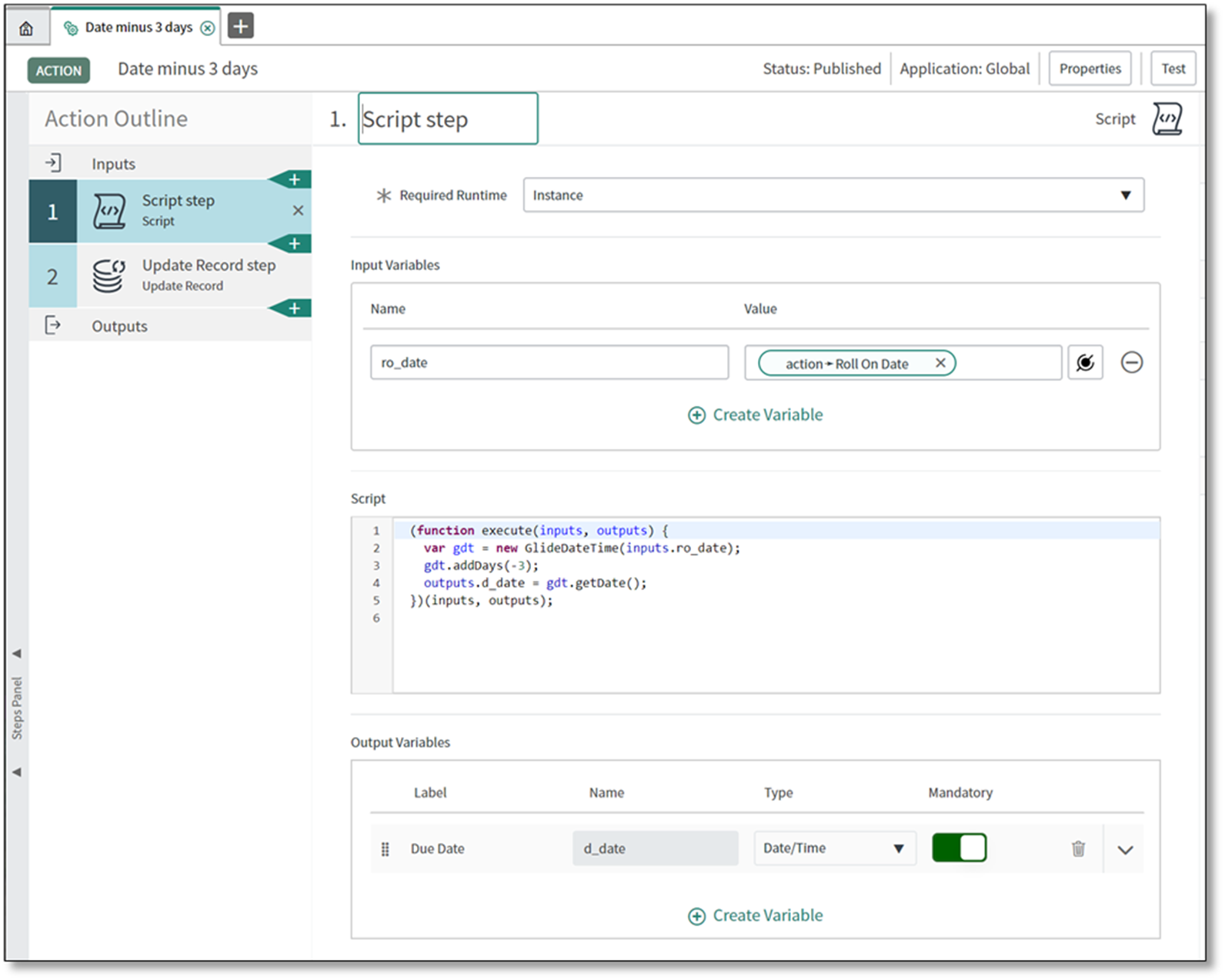
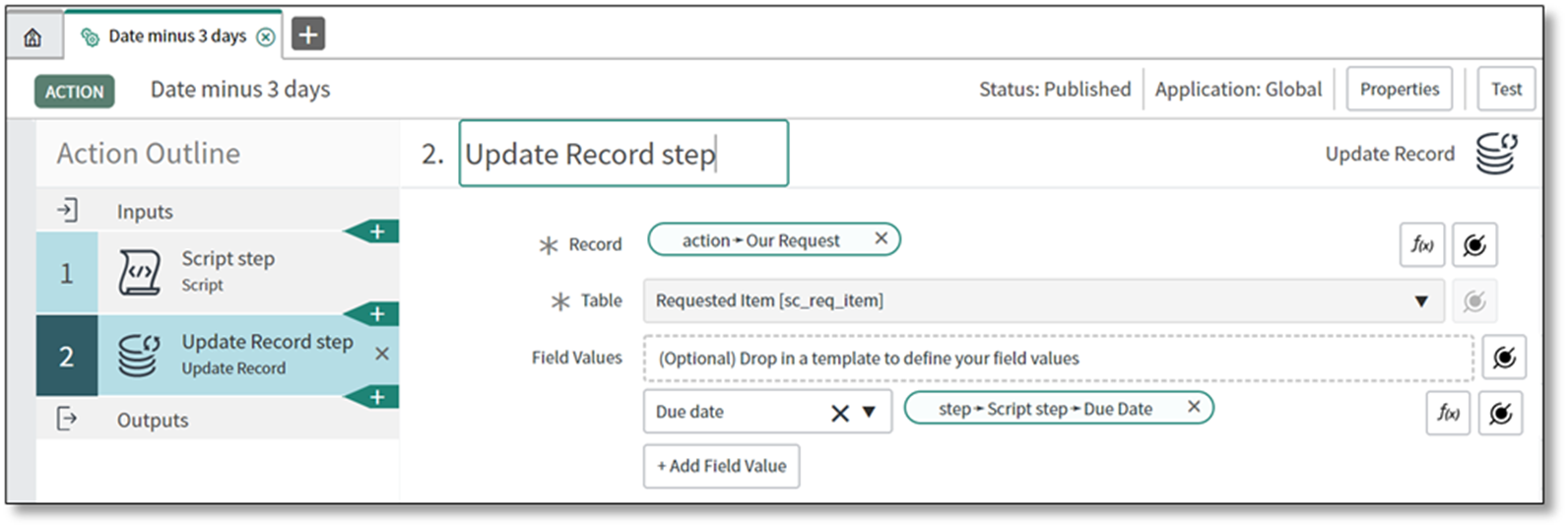
What I did was just to create a separate action, and call it in the flow.

The action, defined


So I didn't actually answer the inlline script question, but I did figure it out. ????
- Mark as New
- Bookmark
- Subscribe
- Mute
- Subscribe to RSS Feed
- Permalink
- Report Inappropriate Content
08-22-2020 06:34 PM
It's basically the same what you are doing here. You are creating a separate action to populate the due date field which can be done inline in your flow with simple 3 lines of code like how i mentioned.
If you are using the inline Function in the flow to populate a specific field as shown below in picture then you should be using below to call the triggered variables
- fd_data.trigger.current.variables.roll_on_date, or maybe
- fd_data.trigger.current.variables.req_item.roll_on_date
If you are creating an action to use it in the flow, you have to define the inputs for the action and access them as inputs.variable_name from the script.
Cheers,
Arsh