- Mark as New
- Bookmark
- Subscribe
- Mute
- Subscribe to RSS Feed
- Permalink
- Report Inappropriate Content
03-06-2020 04:03 AM
Hi ,
I have a requirement to hide all the categories Except "Project Tasks" under Tasks - > All Tasks
How can i achieve it , can you help me where i need to make changes .
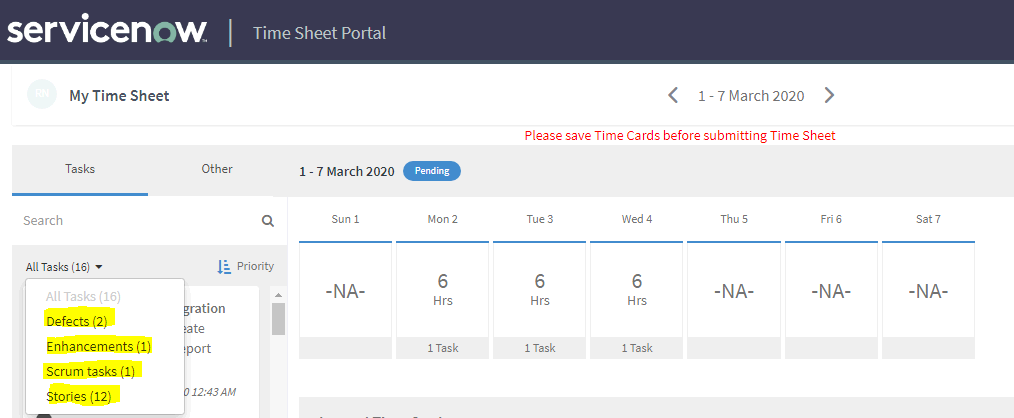
In Time sheet Portal - > Tasks - > All Tasks - > we have the below categories ( Here we can see which all are assigned to the logged in users )
In the below screen shots , you can see the ones which are highlighted in Yellow , we can see only 4 because only those are assigned to me .
I want to hide or remove all those , where i should be able to see only "Project Tasks"
OOB , ServiceNow is proving 13 Categories by default .
1. Incidents
2. problems
3. Change requests
4. Stories
5. Scrum tasks
6. Test plans
7. Project task
8. Projects
9. Defects
10. Enhancements
11. sn_customerservice_case
12. wm_order
13. wm_task

Thanks,
NR
Solved! Go to Solution.
- Mark as New
- Bookmark
- Subscribe
- Mute
- Subscribe to RSS Feed
- Permalink
- Report Inappropriate Content
03-06-2020 04:42 AM
Hi,
Values are passed from the 'Time Card Portal Main Container' widget.
Remove the values from server script.

If I have answered your question, please mark my response as correct and/or helpful.
Thanks,
Suseela P.
- Mark as New
- Bookmark
- Subscribe
- Mute
- Subscribe to RSS Feed
- Permalink
- Report Inappropriate Content
03-06-2020 04:42 AM
- Mark as New
- Bookmark
- Subscribe
- Mute
- Subscribe to RSS Feed
- Permalink
- Report Inappropriate Content
03-06-2020 04:57 AM
Hi Suseela ,
I have tried with your solution , its working as expected .
Thanks
NR
- Mark as New
- Bookmark
- Subscribe
- Mute
- Subscribe to RSS Feed
- Permalink
- Report Inappropriate Content
03-06-2020 04:59 AM
Glad it worked.
Please mark my response as correct and/or helpful, others can see as 'Answered' if they have a similar question/issue in the future.
Thanks,
Suseela P.