- Mark as New
- Bookmark
- Subscribe
- Mute
- Subscribe to RSS Feed
- Permalink
- Report Inappropriate Content
08-31-2019 10:04 AM
I need to created a breakdown for a catalog item variable. Need help as the data is not showing up in the breakdown. I am new to PA advance reporting.
I have a variable name as "Server Name" referring to cmdb_win_server the requirement is for created breakdown for this:
Created break down source and mapping :

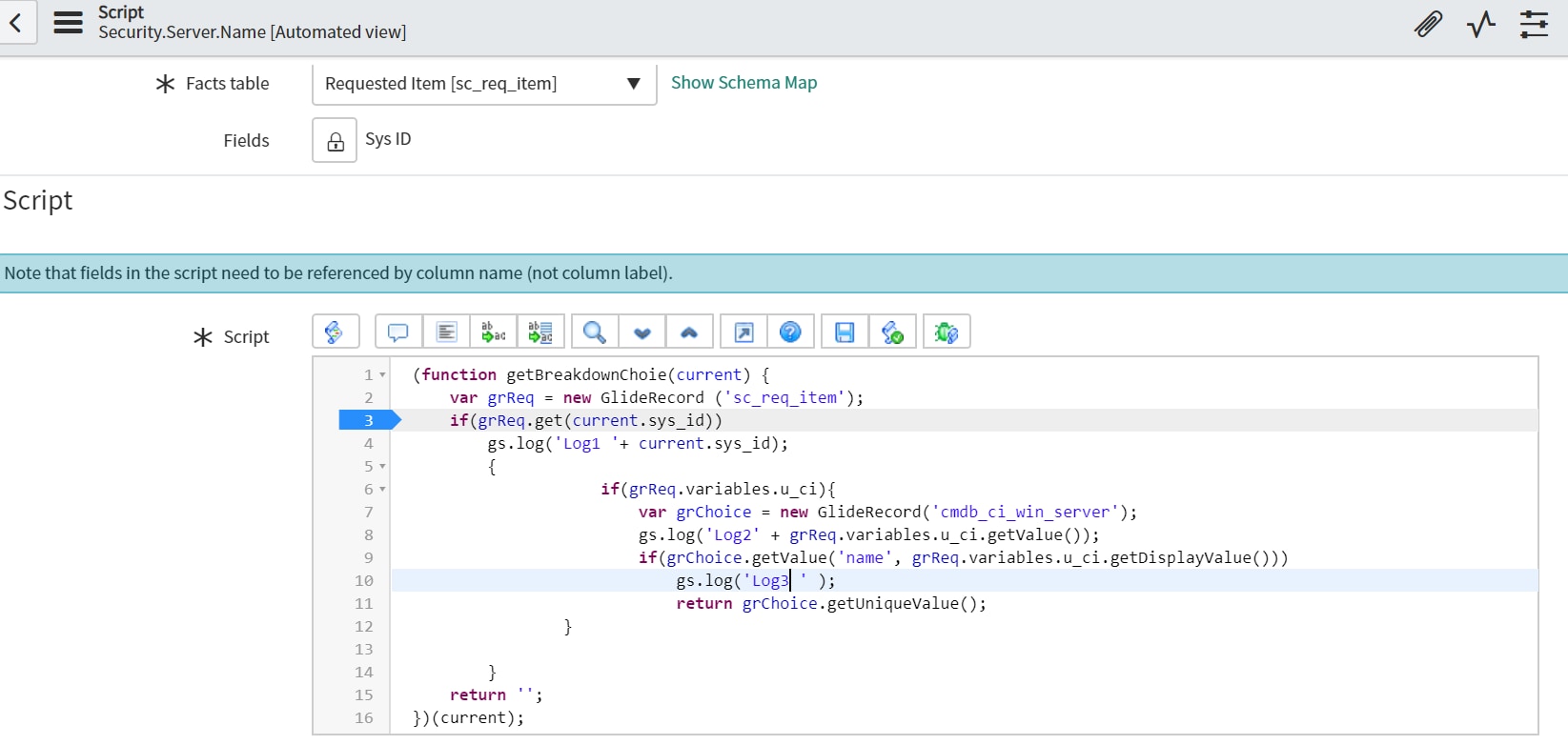
and the scripted mapping is:

Log 1 and Log 2 is running successfully Log 3 is giving java error:

Can anyone help me on this and guide me 🙂
Thanks in advance.
Solved! Go to Solution.
- Labels:
-
Performance Analytics


- Mark as New
- Bookmark
- Subscribe
- Mute
- Subscribe to RSS Feed
- Permalink
- Report Inappropriate Content
09-01-2019 01:38 AM
Hi Kriti,
you are not querying "cmdb_ci_win_server" table in line number 9 properly
change it to below use get method and not getValue() while querying
grChoice.get('name', grReq.variables.u_ci.getDisplayValue());Mark Correct if this solves your issue and also mark Helpful if you find my response worthy based on the impact.
Thanks
Ankur
Ankur
✨ Certified Technical Architect || ✨ 10x ServiceNow MVP || ✨ ServiceNow Community Leader
- Mark as New
- Bookmark
- Subscribe
- Mute
- Subscribe to RSS Feed
- Permalink
- Report Inappropriate Content
09-01-2019 01:38 AM
Hi Kriti,
you are not querying "cmdb_ci_win_server" table in line number 9 properly
change it to below use get method and not getValue() while querying
grChoice.get('name', grReq.variables.u_ci.getDisplayValue());Mark Correct if this solves your issue and also mark Helpful if you find my response worthy based on the impact.
Thanks
Ankur
Ankur
✨ Certified Technical Architect || ✨ 10x ServiceNow MVP || ✨ ServiceNow Community Leader
- Mark as New
- Bookmark
- Subscribe
- Mute
- Subscribe to RSS Feed
- Permalink
- Report Inappropriate Content
09-01-2019 08:54 AM
- Mark as New
- Bookmark
- Subscribe
- Mute
- Subscribe to RSS Feed
- Permalink
- Report Inappropriate Content
09-02-2019 07:53 AM
Great.
Can you also mark answer as helpful. Thanks in advance
Regards
Ankur
✨ Certified Technical Architect || ✨ 10x ServiceNow MVP || ✨ ServiceNow Community Leader


- Mark as New
- Bookmark
- Subscribe
- Mute
- Subscribe to RSS Feed
- Permalink
- Report Inappropriate Content
09-02-2019 10:59 AM
1) I highly discourage using GlideRecord in a Performance Analytics script. See if you can do this in a view instead. The performance will be much (much better) better. Using a script, you have to run a separate query for every row returned by your indicator source. With a view, it is all done in a single query on the database. It won't make much of a difference if you have 10 rows or 100 rows, but if you have thousands or tens of thousands, you'll surely notice.
2) Why are you breakdown down on a CI? This is generally discouraged as you often end up with too many elements in the breakdown. If you only have a few windows servers, this isn't an issue, but if you have more than a few thousand, you may see performance issues rendering this on a dashboard.