- Mark as New
- Bookmark
- Subscribe
- Mute
- Subscribe to RSS Feed
- Permalink
- Report Inappropriate Content
02-27-2020 12:46 AM
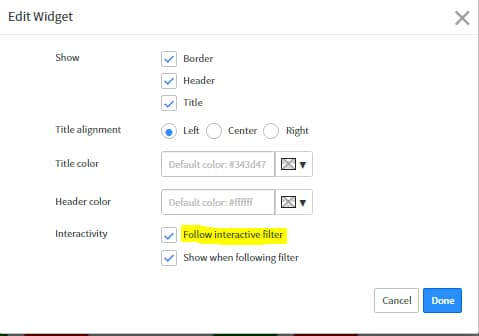
Lets say i have a Service interactive filter and Service.parent interactive filter in a dashboard, If i select the Service.parent is selected the other interactive filter populates automatically?
Solved! Go to Solution.
- Labels:
-
Performance Analytics


- Mark as New
- Bookmark
- Subscribe
- Mute
- Subscribe to RSS Feed
- Permalink
- Report Inappropriate Content
02-27-2020 07:36 AM
Interactive filters do not listen to each other. You can use a Cascading Interactive Filter (which is one filter, not two, but may work for your use case).
Here is some more info:
Office Hours from Aug. 14, 2019 when we covered Cascading Interactive Filters - https://community.servicenow.com/community?id=community_blog&sys_id=3db1e070dbac4c185129a851ca961903

- Mark as New
- Bookmark
- Subscribe
- Mute
- Subscribe to RSS Feed
- Permalink
- Report Inappropriate Content
02-27-2020 03:19 AM
Could you please elaborate the issue you are facing and kindly share the screenshot.
- Mark as New
- Bookmark
- Subscribe
- Mute
- Subscribe to RSS Feed
- Permalink
- Report Inappropriate Content
02-27-2020 03:43 AM
Lets say i have an interactive filter "Service" for Service based on CMDB_CI_Service table which pulls all the Services. I also have another interactive filter "Service Parent" which pulls all the Services Parent.
Now having both the interactive filters if i select an element in Service Parent only its child services should display in the "Service" Interactive filter
Is this possible?
- Mark as New
- Bookmark
- Subscribe
- Mute
- Subscribe to RSS Feed
- Permalink
- Report Inappropriate Content
02-27-2020 03:51 AM

- Mark as New
- Bookmark
- Subscribe
- Mute
- Subscribe to RSS Feed
- Permalink
- Report Inappropriate Content
02-27-2020 03:23 AM