
- Mark as New
- Bookmark
- Subscribe
- Mute
- Subscribe to RSS Feed
- Permalink
- Report Inappropriate Content
09-09-2020 09:52 AM
I need to create an interactive filter that allows me to set in between dates in a dashboard. Similar to the date filter currently exists in standard reporting but in a widget that I can add to a dashboard. I don't need the time, just the dates. So far I've found only 1 script in the community with an update set that creates a macro and a widget, but didn't work for me. Does anyone have a different script or update set that can help me create this filter?

Solved! Go to Solution.
- 92,028 Views
- Mark as New
- Bookmark
- Subscribe
- Mute
- Subscribe to RSS Feed
- Permalink
- Report Inappropriate Content
09-23-2020 12:26 PM
Hey, this worked for me. The update set is a combination of 2 contributions based on this post:
Interactive Filter "between dates"
Basically the update set creates:
- a new widget called "custom interactive filter"
- and a UI macro, which is the backend magic that works with the new widget created
the widget coding is originally from the accepted solution from the mentioned post, but the macro part doesn't work, so the macro fixed code was posted in a later reply (that for some reason I am not able to find). But the macro displayed text was in Norway language, so I had to translate it.
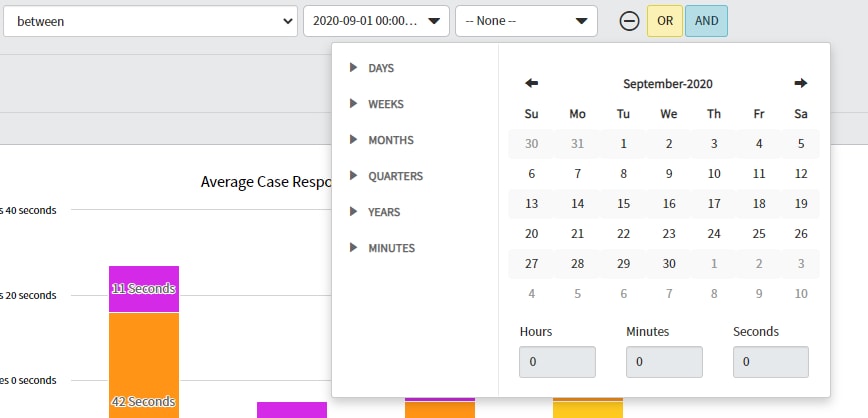
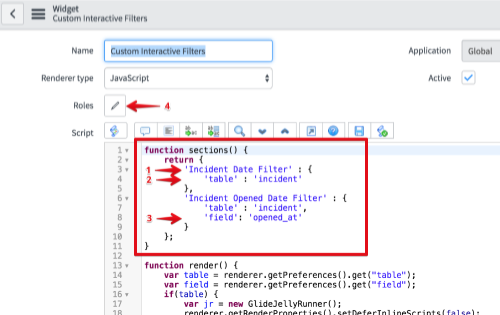
So the final update set is like a hybrid solution compiled in the attached update set, which should give you something like pic below. You will only need to update the table names in the widget coding(pic 2), everything is explained in the linked post. So at the end you will have one filter for each table needed. Let me know any questions.

pic2

- Mark as New
- Bookmark
- Subscribe
- Mute
- Subscribe to RSS Feed
- Permalink
- Report Inappropriate Content
02-25-2021 11:12 PM
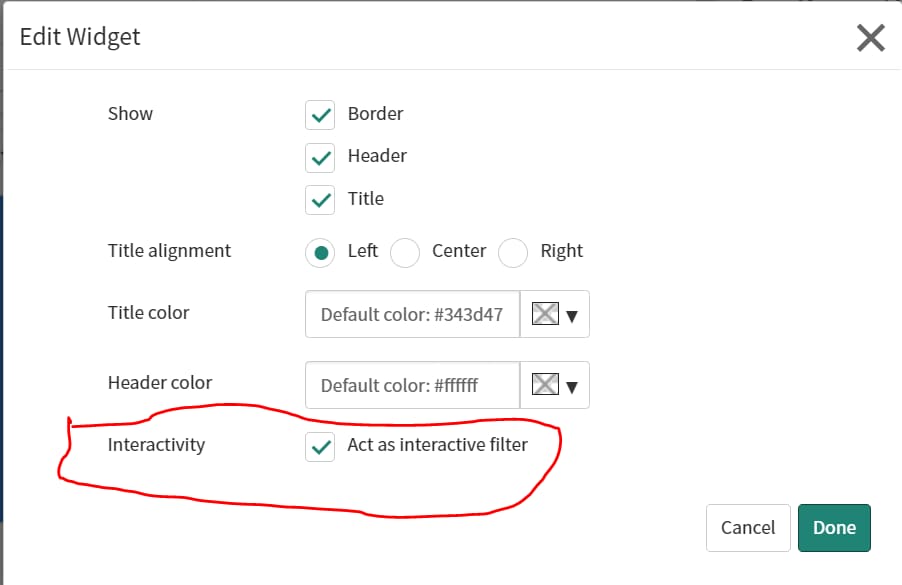
I followed the steps as mentioned above. But after exporting the xml on my PDI it works in the beginning and at later stage it stops. Even i do not get any checkbox to select "Interactivity" as provided in the attached screenshot. Can you please help me out.

- Mark as New
- Bookmark
- Subscribe
- Mute
- Subscribe to RSS Feed
- Permalink
- Report Inappropriate Content
04-20-2022 01:20 PM
Hello,
I have same issue with update set. Have you got solution for it?




- Mark as New
- Bookmark
- Subscribe
- Mute
- Subscribe to RSS Feed
- Permalink
- Report Inappropriate Content
05-31-2022 08:15 AM
Hi,
Im facing the same issue. Were you able to fix this?
Thanks!
- Mark as New
- Bookmark
- Subscribe
- Mute
- Subscribe to RSS Feed
- Permalink
- Report Inappropriate Content
05-31-2022 11:16 AM
Try this other code from another post: Date Range filter in a dashboard
The pieter.goris code that is referred on that post is the same from my update set.
- Mark as New
- Bookmark
- Subscribe
- Mute
- Subscribe to RSS Feed
- Permalink
- Report Inappropriate Content
03-22-2021 01:59 PM
Hi Dario,
I applied the update set in my personal instance and it working perfectly fine. When I did the same in my Dev environment. It's not working. Am I missing anything?
Regards,
Pavan Devineni.
