- Mark as New
- Bookmark
- Subscribe
- Mute
- Subscribe to RSS Feed
- Permalink
- Report Inappropriate Content
04-17-2018 09:12 PM
We want the email body of the scheduled report to utilize our email layout which contains our company branding. We can already do this for all email notifications we have set in the system.
We can manually copy the layout HTML code on the report_body of Scheduled Report but this will be tedious and will not be flexible in the long run in case we need to update our company branding (we have to manually update each scheduled report if ever). Any ideas?
SOLUTION UPDATE:
I evolved the solution provided below so that it can be applied selectively (not all outbound emails). Please check out this article wherein I detailed the approach we took for this issue.
Solved! Go to Solution.
- Labels:
-
Reporting

- Mark as New
- Bookmark
- Subscribe
- Mute
- Subscribe to RSS Feed
- Permalink
- Report Inappropriate Content
04-17-2018 10:42 PM
Hi,
I was wondering how you have applied the branding in first place for all other emails.
If you have done it by writing a business rule on sys_email table to populate the HTML layout once an email record is inserted, it should also work out for scheduled reports.
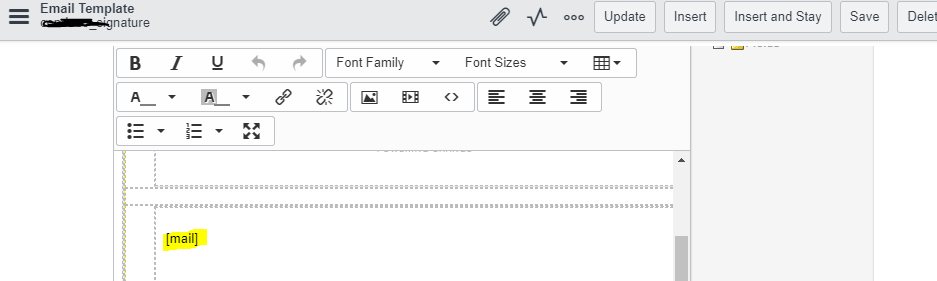
From the below script. create a email template first and place a mail string in your template.

One its done, write a BR on sys_email template.
var gr = new GlideRecord("sysevent_email_template");
if(gr.get("name", "company_signature"))
{
	var signature = gr.message_html;
}

var mybody = signature.replace(/\[mail\]/g, current.body);
current.body = mybody;
Hope that explains it
Thanks
Gaurav

- Mark as New
- Bookmark
- Subscribe
- Mute
- Subscribe to RSS Feed
- Permalink
- Report Inappropriate Content
01-02-2026 01:00 AM
Hi, the link to your article doesn't work anymore. Can you try to re-post it or provide the name of the article so we can search for it?
TIA /Per

- Mark as New
- Bookmark
- Subscribe
- Mute
- Subscribe to RSS Feed
- Permalink
- Report Inappropriate Content
05-12-2026 03:27 AM
+1