- Mark as New
- Bookmark
- Subscribe
- Mute
- Subscribe to RSS Feed
- Permalink
- Report Inappropriate Content
05-06-2020 07:26 AM
Hi all,
I want to increase the timing of error message before abort action and redirection of page ,as it is immediately disappear and redirect.I tried with setTimeOut() and wait().
Note:My script is in script section of Record producer.
Kindly provide some suggestions.
Thanks in advance.
Solved! Go to Solution.
- Labels:
-
Security Incident Response


- Mark as New
- Bookmark
- Subscribe
- Mute
- Subscribe to RSS Feed
- Permalink
- Report Inappropriate Content
05-06-2020 07:56 AM
Hi,
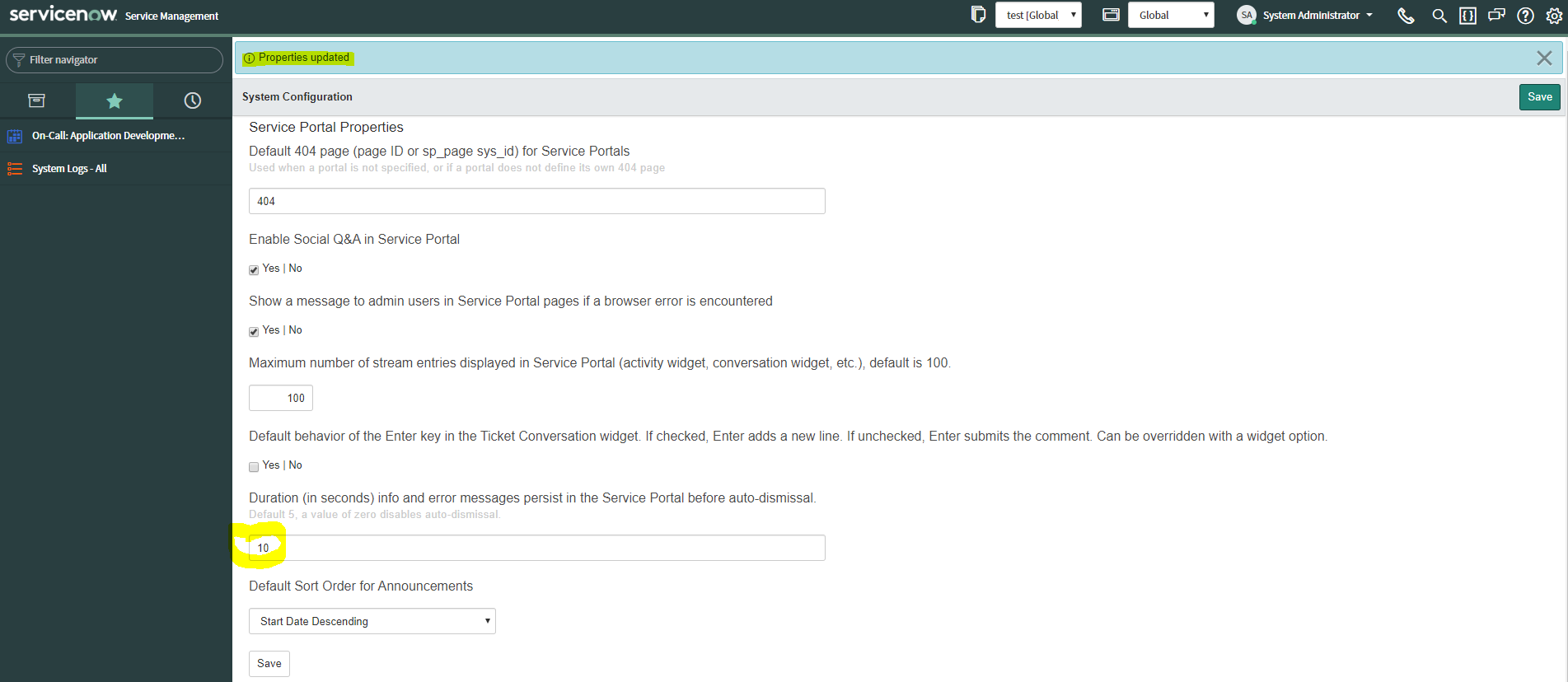
you have two ways to set this custom value:
- directly in the system property glide.service-portal.notification_timeout.seconds
- from Service Portal > Properties as already suggested by Jaspal
I've just tried to set the value to 10 seconds in my PDI, it works fine, i'm using the latest patch of Orlando release:

If I have answered your question, please mark my response as correct and/or helpful.
Thank you very much
Cheers
Alberto


- Mark as New
- Bookmark
- Subscribe
- Mute
- Subscribe to RSS Feed
- Permalink
- Report Inappropriate Content
05-06-2020 07:32 AM

- Mark as New
- Bookmark
- Subscribe
- Mute
- Subscribe to RSS Feed
- Permalink
- Report Inappropriate Content
05-06-2020 07:47 AM
Hi Jaspal,
Thanks for your suggestion.
I tried it and I'm unable to save increase timing.
- Mark as New
- Bookmark
- Subscribe
- Mute
- Subscribe to RSS Feed
- Permalink
- Report Inappropriate Content
05-06-2020 07:56 AM
Hi,
you have two ways to set this custom value:
- directly in the system property glide.service-portal.notification_timeout.seconds
- from Service Portal > Properties as already suggested by Jaspal
I've just tried to set the value to 10 seconds in my PDI, it works fine, i'm using the latest patch of Orlando release:
If I have answered your question, please mark my response as correct and/or helpful.
Thank you very much
Cheers
Alberto
- Mark as New
- Bookmark
- Subscribe
- Mute
- Subscribe to RSS Feed
- Permalink
- Report Inappropriate Content
05-06-2020 08:00 AM
Can you make sure there ins't any scope selected. Is the field grayed out? Also, make sure you have not impersonated some user.