- Mark as New
- Bookmark
- Subscribe
- Mute
- Subscribe to RSS Feed
- Permalink
- Report Inappropriate Content
03-03-2026 09:58 AM - edited 03-03-2026 10:01 AM
I am working on a POC to create a custom Translator Configuration to use in Dynamic Translation.
Since I can't test any of the OOTB integrations (Microsoft Azure Translator Service Spoke for example) because I don't have a valid API key for any of these services, I can't see these subflows running successfully, view the actual values that are sent as input to the subflow and then see what is sent as output from the subflow. And since the documentation is very limited in this regard, it is quite difficult to implement something successfully.
Instead of starting from scratch, I decided to copy one of the OOTB subflows and try to replicate it as much as possible.
I created a subflow that uses Open AI and receives exactly what Microsoft's OOTB spoke receives, but I can't be sure if the output of my subflow is exactly the same as what the OOTB subflow returns (this is because, as I said above, I can't test the OOTB subflow because I don't have a valid API key for that service).
Image2 shows what my subflow is returning as output.
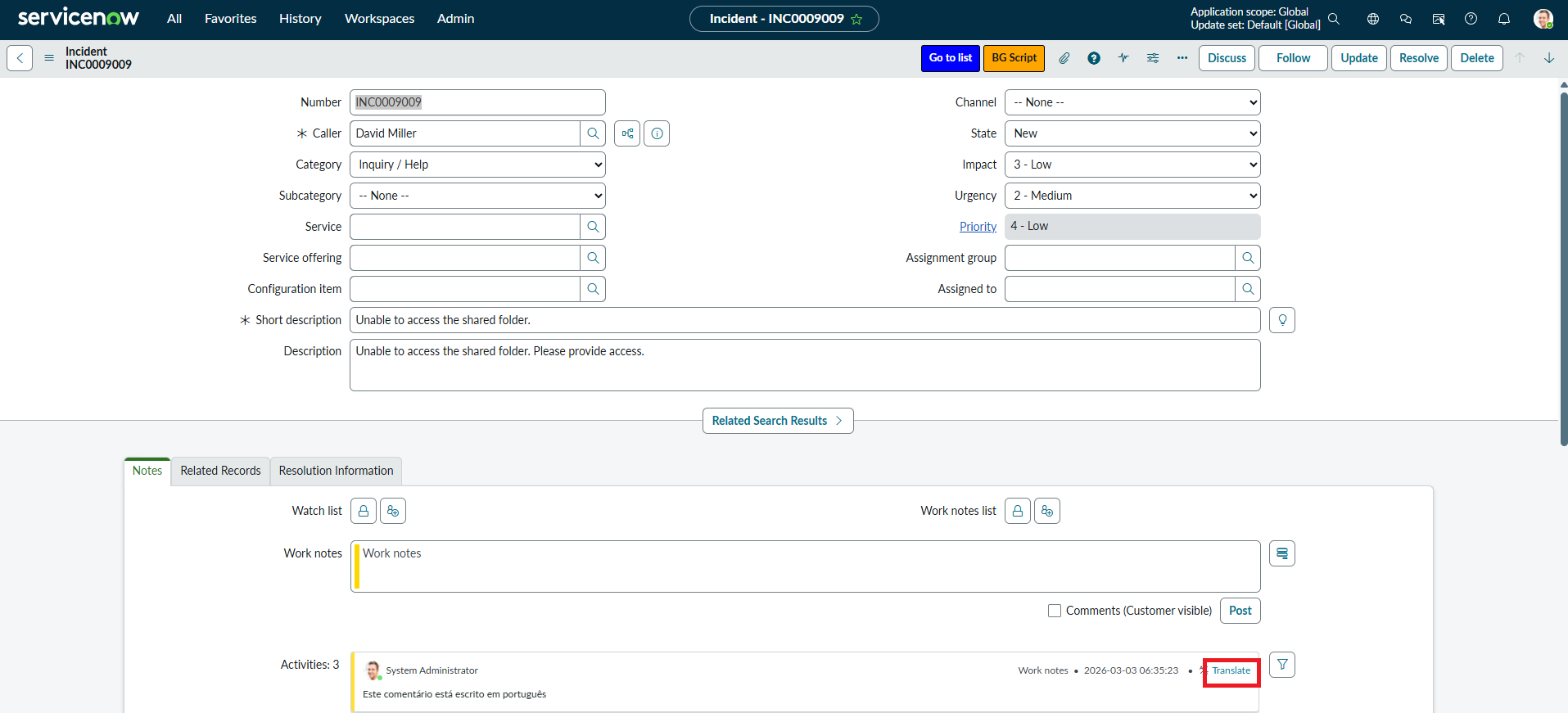
The subflow runs when I click on the Translate button > Image 1.
And this is due to the Translator Configuration I created > Image0.
The output of my subflow was built taking in consideration the documentation available here: https://www.servicenow.com/docs/r/platform-administration/dynamic-translation/integrate-translation-...
In summary, it seems to me that everything is more or less configured correctly, but I deduce that there is a problem with the output of my subflow, which probably does not have all the necessary information or it is not well formatted, and this causes the content that is being translated correctly by my subflow not to then be displayed in the UI.
Can anyone help?
Solved! Go to Solution.
- Mark as New
- Bookmark
- Subscribe
- Mute
- Subscribe to RSS Feed
- Permalink
- Report Inappropriate Content
03-06-2026 02:35 AM
I finally managed to get Dynamic Translation working with a custom configuration/translation service provider other than the OOTB spokes.
My steps were:
- I cloned the "Translate Text" subflow from Microsoft Azure Translator Service Spoke
- I cloned the "Translate Text" action from Microsoft Azure Translator Service Spoke (which is step 4 of the subflow I mentioned above)
- In my custom subflow, which is the clone of "Translate Text" (point 1), I replaced the "Translate Text" action with the custom action, which is the clone of "Translate Text" (point 2)
- In my custom action, I left my action inputs and outputs exactly as they were, I just changed and added some script steps to call my custom/3rd party translation service API and then parse the response that comes from it and configure it as the OOTB action expects.
- In addition, I had to create a Translator Configuration record, which is marked as default for translation and calls the subflow that I cloned above.
If anyone has any doubt or issues, you can reply to this thread and I'll try to help you out.

- Mark as New
- Bookmark
- Subscribe
- Mute
- Subscribe to RSS Feed
- Permalink
- Report Inappropriate Content
03-04-2026 09:20 AM
Hi @PJBNascimento,
Have you installed the Internationalization plugin, which is the core plugin for translation? If not, then install this plugin; this will help you to translate.
If you find my answer useful, please mark it as Helpful and Correct. 😊
Regards,
Soham Tipnis
ServiceNow Developer || Technical Consultant
LinkedIn: www.linkedin.com/in/sohamtipnis10

- Mark as New
- Bookmark
- Subscribe
- Mute
- Subscribe to RSS Feed
- Permalink
- Report Inappropriate Content
03-05-2026 01:12 AM
Hi,
I've the internationalization plugin installed, it's not the solution that I'm looking for here, neither the problem.
- Mark as New
- Bookmark
- Subscribe
- Mute
- Subscribe to RSS Feed
- Permalink
- Report Inappropriate Content
03-06-2026 02:35 AM
I finally managed to get Dynamic Translation working with a custom configuration/translation service provider other than the OOTB spokes.
My steps were:
- I cloned the "Translate Text" subflow from Microsoft Azure Translator Service Spoke
- I cloned the "Translate Text" action from Microsoft Azure Translator Service Spoke (which is step 4 of the subflow I mentioned above)
- In my custom subflow, which is the clone of "Translate Text" (point 1), I replaced the "Translate Text" action with the custom action, which is the clone of "Translate Text" (point 2)
- In my custom action, I left my action inputs and outputs exactly as they were, I just changed and added some script steps to call my custom/3rd party translation service API and then parse the response that comes from it and configure it as the OOTB action expects.
- In addition, I had to create a Translator Configuration record, which is marked as default for translation and calls the subflow that I cloned above.
If anyone has any doubt or issues, you can reply to this thread and I'll try to help you out.
- Mark as New
- Bookmark
- Subscribe
- Mute
- Subscribe to RSS Feed
- Permalink
- Report Inappropriate Content
04-16-2026 02:16 AM
i tried our your 5 steps too, but it didnt worked for me..
so i created my own very simple subflow, with just inputs, an action with a REST Step, and output.
The Action is working fine, the whole subflow is working fine.
Also created Translation configuration and added the subflow for "default for translate".
I added a servicenow subflow for "default for detect"
But when i click on the Dynamic Translation Button in the Incident form, the subflow is not triggert at all.
Do you know, what is missing in the subflow to map it on this dynamic translation button?
what is the trigger?
Thanks a lot!