Stage Issue of requested item...

- Mark as New
- Bookmark
- Subscribe
- Mute
- Subscribe to RSS Feed
- Permalink
- Report Inappropriate Content
11-04-2014 06:59 AM
I am stuck here and need some help...
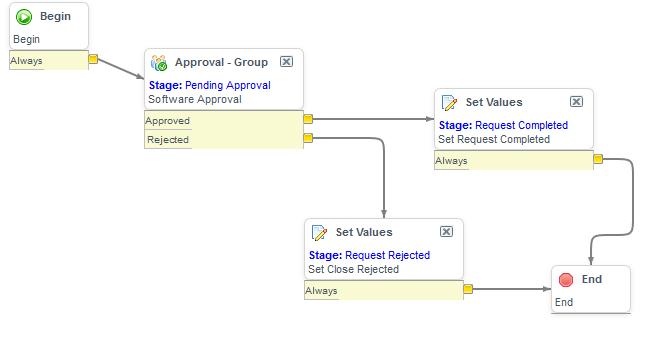
Just created a simple catalog with 2 simple text variables and associated a new workflow with it...
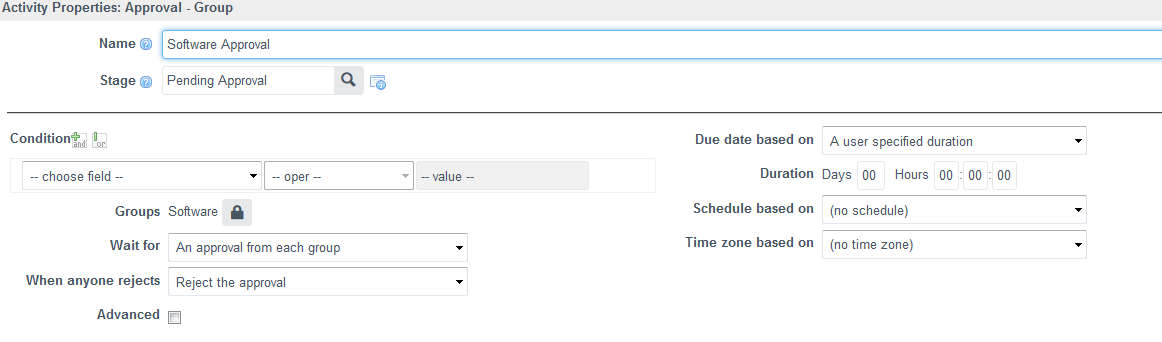
In workflow, immediately after begin, I am setting the stage field to 'Pending Approval(Custom created)'... But as soon as I submit a request , the first stage is showing as 'Request Approved (snapshot attached)'.. I do not want this to appear only for this particular catalog..
Can you please suggest what might be the issue or is this OOB behaviour? Do I need to change something in the workflow properties?


- Mark as New
- Bookmark
- Subscribe
- Mute
- Subscribe to RSS Feed
- Permalink
- Report Inappropriate Content
10-02-2015 09:03 AM
Does anyone have any idea of how the fix would work on Fuji?
- Mark as New
- Bookmark
- Subscribe
- Mute
- Subscribe to RSS Feed
- Permalink
- Report Inappropriate Content
10-18-2015 09:32 PM
Hi Wayne,
On Fuji I used CSS to snip it out of the ESS view by adding this to the custom style sheet for the site.
img[data-original-title*="Request "] {
display: none;
}
If that helps
- Mark as New
- Bookmark
- Subscribe
- Mute
- Subscribe to RSS Feed
- Permalink
- Report Inappropriate Content
03-08-2017 04:05 AM
Hi Kalai
Did you find any solution for this issue. I am also facing similar issue in my workflow.
Thanks
Shaveta
- Mark as New
- Bookmark
- Subscribe
- Mute
- Subscribe to RSS Feed
- Permalink
- Report Inappropriate Content
03-16-2017 11:19 PM
I jumped that ship long back and gave up on it.
These are controlled by OOB scripts and editing it means owning the risk for it break or cause issues at every upgrade.
- Mark as New
- Bookmark
- Subscribe
- Mute
- Subscribe to RSS Feed
- Permalink
- Report Inappropriate Content
11-09-2017 05:53 PM
After fighting with this for hours today I came across this thread and it was very helpful, thanks!
In the Service Portal Service Catalog, the stages are rendered in the widget "Requested Items".
These annoying stages can easily be suppressed by:
- Cloning the OOTB widget "Requested Items"
- Updating the sc_request service portal page to use the new cloned widget
- Update the body HTML template for your cloned widget such that you are hiding the approved and rejected values
- ......&&(stage.value != 'approved')&&(stage.value != 'request_approved')&&(stage.value != 'rejected')&&(stage.value != 'request_rejected')
<div class="panel panel-{{c.options.color}} b" ng-if="always_show || data.list.length">
   <div class="panel-heading">
       <h2 class="panel-title">{{::c.data.title}}</h2>
   </div>
   <div class="list-group">
       <div ng-repeat="item in data.list" class="block list-group-item" >
           <a ng-click="onClick($event, item, item.url, {})" href="javascript:void(0)" >
               <span ng-if="data.image_field" class="pull-left thumb-sm avatar m-r">
                   <img ng-src="{{item.image_field}}" alt="..." class="img-circle">
               </span>
               <div >
                   <div ng-class="{'l-h-40': !item.secondary_fields.length}">{{item.display_field}}</div>
                   <small class="block text-muted m-b-xs" ng-repeat="f in item.secondary_fields">
                       <span ng-if="!$first"> • </span>
                       <span ng-switch="f.type" title="{{::f.label}}">
                           <span ng-switch-when="glide_date"><sn-time-ago timestamp="::f.value" /></span>
                           <span ng-switch-when="glide_date_time"><sn-time-ago timestamp="::f.value" /></span>
                           <span ng-switch-default="">{{f.display_value}}</span>
                       </span>
                   </small>
               </div>
           </a>
           <div ng-if="item.cl.length > 0" class="requested-items-flex-container">
               <button class="flex-item" role="button" ng-click="toggle($event, item)" aria-expanded="{{item.expand}}" aria-label="${collapse state of request}">
                   <img ng-if="item.expand" src="images/filter_hide16.gifx"   alt="${Expand state of request}"/>
               <img ng-if="!item.expand" src="images/filter_reveal16.gifx" alt="${Expand state of request}"/>
               </button>
               <div class="flex-item" ng-if="!item.expand">
                 <span ng-repeat="stage in item.cl">
                       <span ng-if="stage.value == item.stage">
                           <img src="/images/sp-icon-check-circle.png" data-toggle="tooltip" data-placement="top" ng-attr-title="{{stage.label}}" />
                       </span>
                       <span ng-if="(stage.value != item.stage)&&(stage.value != 'approved')&&(stage.value != 'request_approved')&&(stage.value != 'rejected')&&(stage.value != 'request_rejected')">
                           <img src="/images/sp-icon-empty-circle.png" data-toggle="tooltip" data-placement="top" ng-attr-title="{{stage.label}}" />
                       </span>
                   </span>
               </div>
               <div class="flex-item" ng-if="item.expand">
                   <div ng-repeat="stage in item.cl">
                       <div ng-if="stage.value == item.stage" class="stage-on">
                           <img src="/images/sp-icon-check-circle.png" alt="{{stage.label}} ${checked}" role="image"/>
                           <span aria-hidden="true">{{stage.label}}</span>
                       </div>
                       <div ng-if="(stage.value != item.stage)&&(stage.value != 'approved')&&(stage.value != 'request_approved')&&(stage.value != 'rejected')&&(stage.value != 'request_rejected')" class="stage-off text-muted">
                           <img src="/images/sp-icon-empty-circle.png" alt="{{stage.label}} ${un-checked}" role="image"/>
                           <span aria-hidden="true">{{stage.label}}</span>
                       </div>
                   </div>
       </div>
   </div>
</div>