CI list is empty after submission of incident

- Mark as New
- Bookmark
- Subscribe
- Mute
- Subscribe to RSS Feed
- Permalink
- Report Inappropriate Content
12-03-2019 07:32 AM
Sometime within the last week or two, something has happened/changed to where after an incident is created & submitted, you can not change or add a configuration item as the reference list appears empty. When a ticket is generated via inbound email action, we are not able to go back into the incident to add one because the reference list appears empty and typing in the CI just returns an "invalid reference" response. However, when an itil user creates a new incident, you are able to view and select from the list of all available CI's based off of the category/subcategory before you submit it. After submission of that incident, you can not go back and change the CI because the list shows "no records to display".
What is even more strange to me is that if you go back into older incidents created before this issue started, you have the ability to change the CI's on those.
The only recent change we have made within that time frame (that we are aware of) was an update set containing changes and additions to field mapping for users, but there were no issues in our dev instance when creating an incident and going back to change a CI or to add one (maybe there wouldn't be since it does not sync up like prod? I'm not sure). Any help or advice would be greatly appreciated!
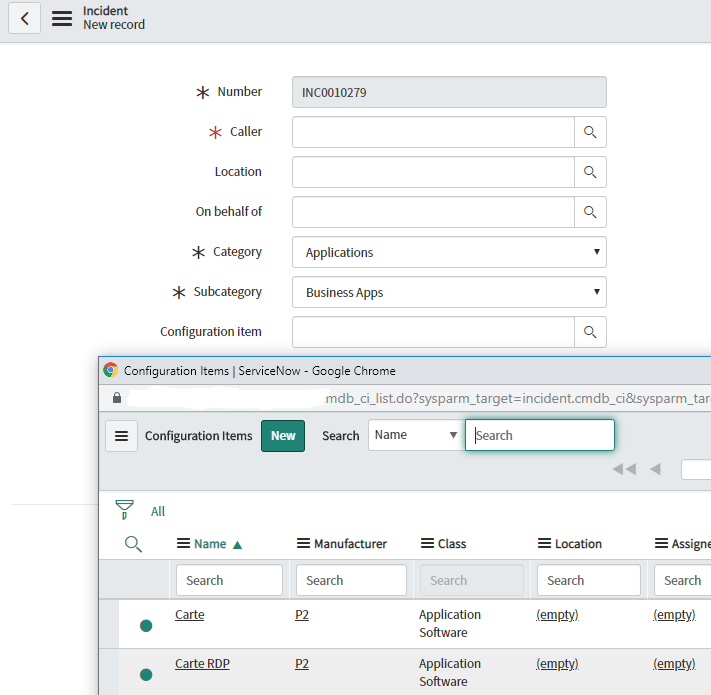
This is the CI list showing up before an incident is submitted:

This is the CI list showing empty after an incident is submitted and trying to change it:


- Mark as New
- Bookmark
- Subscribe
- Mute
- Subscribe to RSS Feed
- Permalink
- Report Inappropriate Content
02-19-2021 10:23 AM
I know this is an old post, but it helped me figure out an issue I was seeing just like this. OOTB, the dependent value is set to company, which helps in a multi-domain setup. It works OOTB as long as the incident doesn't have the company set. In my case, we have incidents being created by an integration that is setting the company field. That caused it to fail to show any CI's because none of the CI's have a company value set. You may have had something similar.
Of course, removing the dependent field of company would resolve it as long as you aren't multi-domain. You'd have to remember to add it back if you ever went multi-domain. I think a more sane option would be for ServiceNow to leave it blank unless multi-domain is configured.
Lesson learned and this thread helped me figure out what was going on.
Thanks,
- Mark as New
- Bookmark
- Subscribe
- Mute
- Subscribe to RSS Feed
- Permalink
- Report Inappropriate Content
10-05-2021 04:21 AM
Hello Scott,
I got the same issue and I tried above suggestions (removing "Company" value as dependent field), but this did not resolve my issue.
What do you think could be other possible solution?
Thank you!
- Mark as New
- Bookmark
- Subscribe
- Mute
- Subscribe to RSS Feed
- Permalink
- Report Inappropriate Content
02-06-2026 09:03 AM
Hi Cally,
There is a dependent field set on the Task table for Company. Because of this, on the Configuration Item field in Incident or Problem, users can only see CI records that belong to the same company.
For example, if there are five CI records with the company name “ABC”, and you select “ABC” in the Company field on the Incident, then only those five CI records will be visible.
If no company is selected on the Incident record, then no CI records will be visible.

Here total 33 ci record for the campany named ' 'ACME China' on the configuration item(cmdb_ci) table.

Select the same campany on the incident record ' 'ACME China'.'

Now open the Click on the seach icon on the Configuration item field those 33 ci records are appearing with the same campany name.

Or if you want all the ci records on the incident record as well then you just remove the depend field from the dictionary of the configuration item field from the task table then all the ci records are appearing on the incident and problem as well.