- Mark as New
- Bookmark
- Subscribe
- Mute
- Subscribe to RSS Feed
- Permalink
- Report Inappropriate Content
12-12-2019 08:46 AM
Hi Team,
Good Day!!
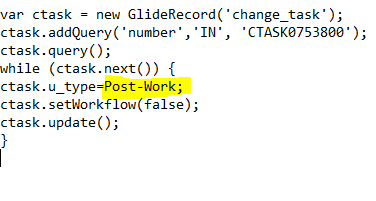
I need a background script for changing a field (Task type) value (from Test to Post-Work).
We dont have field value in numbers as like in Incident.Attached the screenshots.


Please check . the script is not working as it takes any value given other than Test,Work,Pre-Work,Post-Works too.
Solved! Go to Solution.
- Labels:
-
Service Catalog
- Mark as New
- Bookmark
- Subscribe
- Mute
- Subscribe to RSS Feed
- Permalink
- Report Inappropriate Content
12-29-2019 10:58 PM
Hello Anand,
We are using IN operator if we want to find numbers from comma separated values provided in query.
For example.
ctask.addQuery('number','CTASK0753800,CTASK0753801,CTASK0753802');
As you need to find it for single ctask, then either you can use addQuery without IN,
var ctask = new GlideRecord('change_task');
ctask.addQuery('number','CTASK0753800');
ctask._query();
if(ctask._next()) {
ctask.u_type="Post-Work";
ctask.setWorkflow(false);
ctask.update();
}
Please mark as Correct Answer and Helpful, if applicable.
Thank You!
Abhishek Gardade
Abhishek Gardade

- Mark as New
- Bookmark
- Subscribe
- Mute
- Subscribe to RSS Feed
- Permalink
- Report Inappropriate Content
12-12-2019 08:47 AM
Change it to "ctask.u_type='Post-Work'", if that value is correct you're missing the quotations.
Please mark this as helpful/correct if it resolved your issue!


- Mark as New
- Bookmark
- Subscribe
- Mute
- Subscribe to RSS Feed
- Permalink
- Report Inappropriate Content
12-12-2019 08:52 AM
Hi there,
I've re written your script a bit. number IN doesn't sound logical. I would hope you only have one change task with that number?
Performing a while, why? You are only updating one record right?
setWorkflow(false), up to you offcourse, I don't know your further specs.
var ctask = new GlideRecord('change_task');
ctask.addQuery('number', 'CTASK0753800');
ctask._query();

if(ctask._next()) {
	ctask.u_type="Post-Work";
	ctask.update();
}
If my answer helped you in any way, please then mark it as helpful.
Kind regards,
Mark
---
LinkedIn
Community article list
Kind regards,
Mark Roethof
Independent ServiceNow Consultant
10x ServiceNow MVP
---
~444 Articles, Blogs, Videos, Podcasts, Share projects - Experiences from the field
- Mark as New
- Bookmark
- Subscribe
- Mute
- Subscribe to RSS Feed
- Permalink
- Report Inappropriate Content
12-28-2019 04:58 AM
Hi there,
Did this solve your question? Or do we need to follow-up on this?
Please mark this answer as correct if it solves your question. This will help others who are looking for a similar solution. Also marking this answer as correct takes the post of the unsolved list.
Thanks.
Kind regards,
Mark
---
LinkedIn
Community article list
Kind regards,
Mark Roethof
Independent ServiceNow Consultant
10x ServiceNow MVP
---
~444 Articles, Blogs, Videos, Podcasts, Share projects - Experiences from the field

- Mark as New
- Bookmark
- Subscribe
- Mute
- Subscribe to RSS Feed
- Permalink
- Report Inappropriate Content
12-29-2019 09:42 AM
Hi,
Try this code. 3 corrections made.
1. IN is not required
2. add quotes to your u_type value.
3. while is not required as you are updating only 1 record.
var ctask = new GlideRecord('change_task');
ctask.addQuery('number', 'CTASK0753800');
ctask.query();
if(ctask.next()) {
  ctask.u_type="Post-Work";
  ctask.update();
}
Mark the comment as a correct answer and helpful once worked.