- Mark as New
- Bookmark
- Subscribe
- Mute
- Subscribe to RSS Feed
- Permalink
- Report Inappropriate Content
07-17-2022 12:10 PM
Hello,
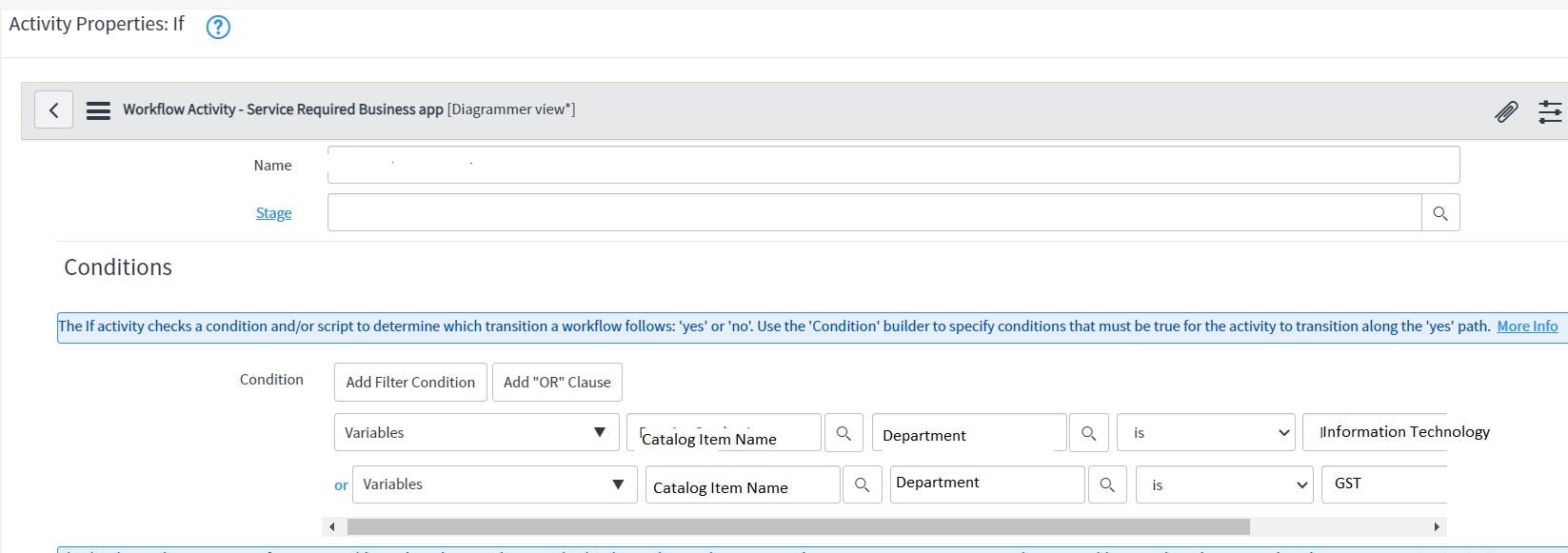
I have a requirement to trigger catalog task in workflow if Department Variable (referencing to cmn_department) contains value "Information Technology" or "GST" then it must trigger the catalog task oresle no
I have written below If condition advanced script but its failing
Reference variable Department has Question and Name value both as Department. Image attached

function ifScript() {
var Department = current.variables.Department.getDisplayValue();
if (Department.toString().indexOf('Information Technology') >-1 || Department.toString().indexOf('GST') >-1){
return 'yes';
}
return 'no';
}
Please advice.
Solved! Go to Solution.
- Labels:
-
Service Catalog


- Mark as New
- Bookmark
- Subscribe
- Mute
- Subscribe to RSS Feed
- Permalink
- Report Inappropriate Content
07-18-2022 01:02 AM
Hello
Then try below script
answer = ifScript();

function ifScript() {
var dept = new GlideRecord('cmn_department');
dept.addQuery('sys_id',current.variables.Department);
dept.query();
if(dept.next())
{
if(dept.name.indexOf("Information Technology") || dept.name.indexOf("GST"))
{
return 'yes';
}
else
{
return 'no';
}

}
Please mark my answer correct if it helps you
- Mark as New
- Bookmark
- Subscribe
- Mute
- Subscribe to RSS Feed
- Permalink
- Report Inappropriate Content
07-17-2022 10:57 PM
Hello Mohith,
This will be true only if Name is "Information Technology" or "GST".
I have many departments which has name containing "Information Technology" or "GST" and there will be more coming up so everytime I have to edit the filters keeping track of it.
Due to which I want to apply if condition that department contains "Information Technology" or "GST".
- Mark as New
- Bookmark
- Subscribe
- Mute
- Subscribe to RSS Feed
- Permalink
- Report Inappropriate Content
07-18-2022 01:02 AM
Hello
Then try below script
answer = ifScript();

function ifScript() {
var dept = new GlideRecord('cmn_department');
dept.addQuery('sys_id',current.variables.Department);
dept.query();
if(dept.next())
{
if(dept.name.indexOf("Information Technology") || dept.name.indexOf("GST"))
{
return 'yes';
}
else
{
return 'no';
}

}
Please mark my answer correct if it helps you
- Mark as New
- Bookmark
- Subscribe
- Mute
- Subscribe to RSS Feed
- Permalink
- Report Inappropriate Content
07-21-2022 12:12 AM
I used includes instead of indexof and it worked fine.
dept.name.indexOfThank You, It helped.

- Mark as New
- Bookmark
- Subscribe
- Mute
- Subscribe to RSS Feed
- Permalink
- Report Inappropriate Content
07-17-2022 02:54 PM

- Mark as New
- Bookmark
- Subscribe
- Mute
- Subscribe to RSS Feed
- Permalink
- Report Inappropriate Content
07-17-2022 10:56 PM
This will take only with Name "Information Technology" or "GST"
I have many departments which has name containing "Information Technology" or "GST" and there will be more coming up so everytime I have to edit the filters keeping track of it.
Due to which I want to apply condition that department contains "Information Technology" or "GST".