Learn about the order states from initial capture through enrichment, decomposition, fulfillment, and completion.
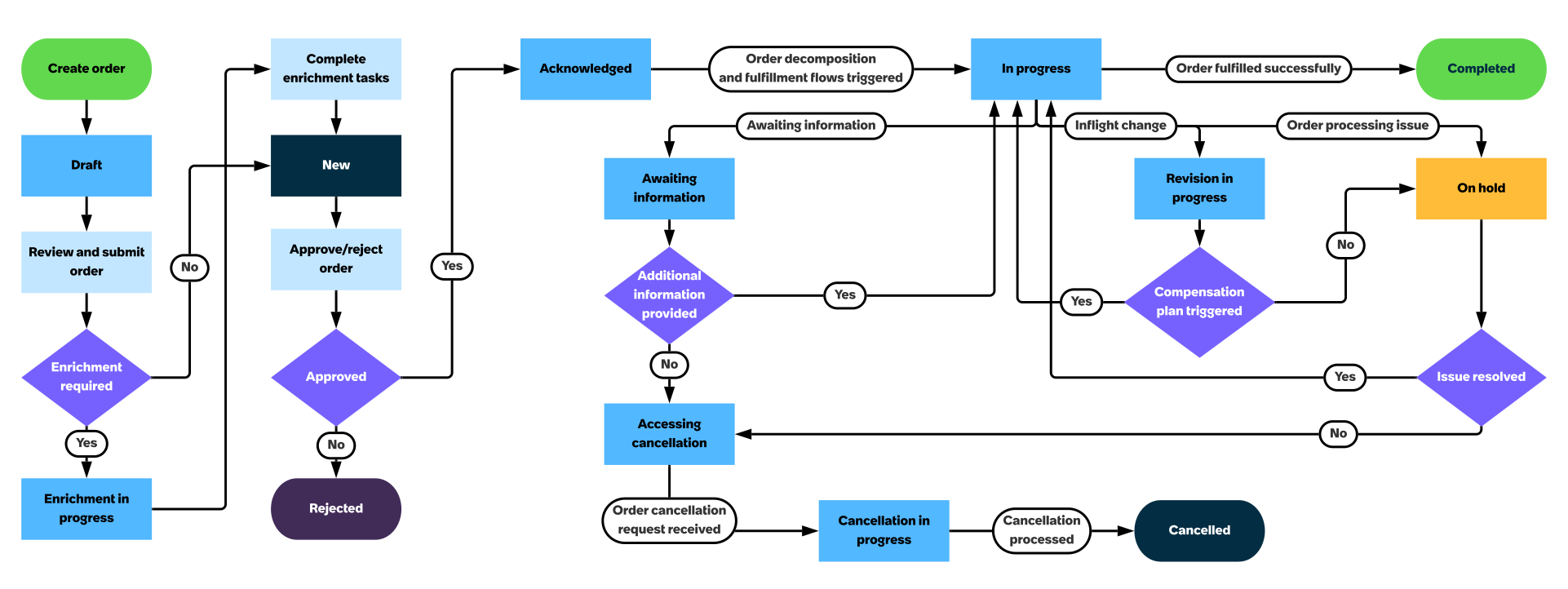
When you create an order with add as the action type, the order state changes after each step or a decision point as shown in the following illustration.Figure 1. Order states
A new order gets created in the Draft state.
After you review and submit the order, either of the two things happen:
If post-capture order enrichment is configured, enrichment tasks are created, and the order state changes to Enrichment in progress.
If you're blocked on order enrichment tasks, change the order state to Enrichment on hold. When
you're unblocked, change the order state back to Enrichment in progress.
If the details captured while creating the order are sufficient to process the order and no enrichment is required, then the order state changes to New.
When the order is in the New state, you can either approve or reject the order. Accordingly, the state changes to either Acknowledged or Rejected.
The order in the Acknowledged state then undergoes decomposition. Domain orders are created and fulfillment flows are triggered and the order state changes to In progress.
If the order is successfully fulfilled, the order state changes to Completed. If there are issues during order processing, then the outcome depends on how the issue was handled. The scenarios and their outcomes are listed in the
following table.
Scenario
State
Outcome
More information needed to process the order
Awaiting information
If additional information is received, the order state changes to In progress.
Or else, the order state changes to Accessing cancellation.
Inflight order change
Revision in progress
If compensation plan is triggered, then the order state changes back to In progress.
Or else, the order state changes to Accessing cancellation.
Issues during order processing
On hold
If the issue blocking the order processing is resolved, then the order state changes back to In progress.
Or else, the order state changes to Accessing cancellation.
After the cancellation request is reviewed and processed, orders in the Accessing cancellation state change to Canceled.