Creating models
Creating models is the first step to taking advantage of Natural Language Understanding (NLU) in your instances. Create models for Virtual Agent and AI Search in the NLU Workbench.
You create NLU models for consumption by the ServiceNow applications
Virtual Agent or AI Search.
Remarque :
For Issue Auto Resolution, a prebuilt model is provided for you to configure.
To start creating models, set your scope to the application scope you want for your new model. Then navigate to . The Virtual Agent tab opens by default. Select the appropriate tab for the model you want to create.
New model creation
When you select the Create new model button, a modal opens to display your model creation options. Start by selecting one of the icons: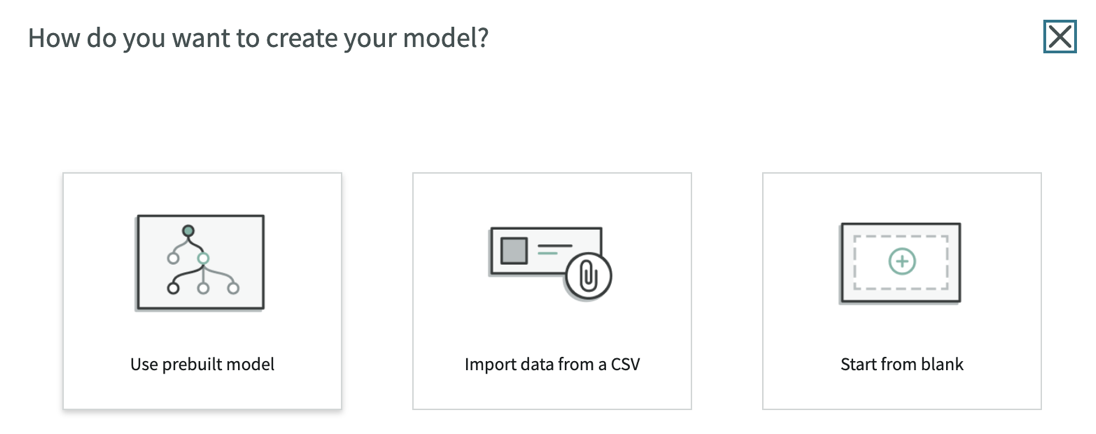
- Create an NLU model using a pre-built model: Copy a prebuilt model and its contents as a starting point for your new model.
- Create an NLU model from a CSV file: Upload a CSV file containing a list of intents and corresponding utterances.
- Create an NLU model from blank: Build a model from scratch and add intents and utterances as you go.
After creating, add content to your model. The intents, utterances, entities, and vocabulary you add helps improve the model's ability to interpret natural language. See Build and train your model.
Duplicating, exporting, and updating
After creating a model, you have options to use that model across other models and instances.
With the NLU Workbench, you can perform the following actions with your
models:
- Duplicate an NLU model: Copy a model to create a model with the same content.
- Export an NLU model: Export a model as a CSV file containing the associated utterances and intents. Share the model or use it to create one.
- Add an NLU model to an update set: Add a model and its artifacts to an update set to transfer the model across instances.