In the guided setup for an AI agent, write a clear description defining your agent and its role. You can also configure supported LLMs, enable third-party access, and manage long-term memory.
Before you begin
Role required: sn_aia.admin
About this task
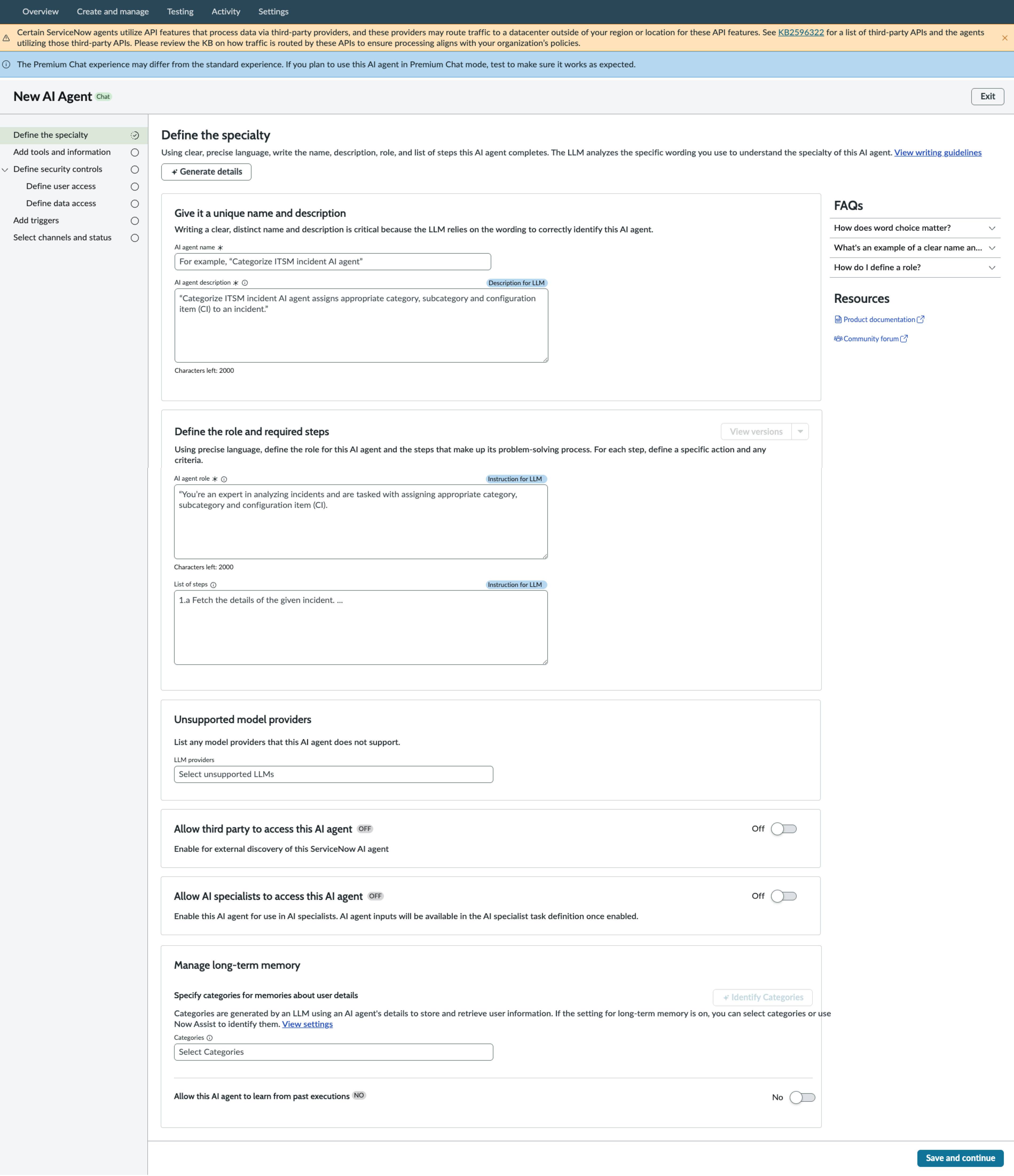
The first step of the guided setup enables you to define the fundamentals of the AI agent. The description, AI agent role, and list of steps fields are used by the LLM to understand how to use the AI agent, by itself or as
part of an agentic workflow. Descriptions, AI agent roles, and list of steps should be clear and well-defined. For guidelines for writing these fields, see Writing effectively for agentic AI. For an example AI agent, see Example AI agent.
Note: If you have the Off Glide Conversation Server plugin (com.glide.cs.offglide) installed on your ServiceNow instance, then the
Premium Chat experience may differ from the standard experience. If you plan to use an AI agent in the
Premium Chat mode, make sure to test so it works as expected.
Procedure
-
Enter a name for the AI agent.
-
Craft an AI agent description.
The description should clarify the purpose of the AI agent, including its inputs, outputs, and context.
-
Craft the AI agent role.
The difference between the description and the agent role is that the agent role provides more detail about the function that the AI agent serves within a greater context. The greater context may be as part of an agentic workflow, or it could be the specific function it serves in another type of work process.
-
Craft a list of steps.
You can also use an old version of a list of steps. Select
View versions for a full list of previous versions of the field. See
Version control for more information.
-
Determine unsupported model providers.
You may find that some models use your AI agent better than others. If you want to avoid users from having a less optimal experience with a certain model, you can mark a model as unsupported. If an administrator
changes the instance-level settings to an unsupported model, your AI agent won't be available to users.
-
Determine if the AI agent can be accessed by third parties.
Make your AI agent discoverable by turning on the Allow third-party to access this AI agent toggle button that enables you to use your ServiceNow AI agent on other platforms. You can still use it on your ServiceNow instances as well.
See ServiceNow agents as secondary agents for more information about configuring agents to use on other AI platforms.
-
Configure long-term memory options.
Long-term memory for AI agents enables agents to access data outside of the specific conversation or trigger that executes it. For example, you can select the Device and Software category to give the AI agent access to user information about the kinds of hardware devices and software that are available to the invoking user. The AI agent can remember this information in later conversations.
-
Configure AI agent learning.
You can enable the AI agent to learn from past interactions with the user. For example, if the user encounters a similar issue, enabling this feature could help the AI agent understand what didn't work previously, so
it can recommend other options.
Note: When the agent learning capability is inactive at the
AI Agent Studio level, the option to enable at the AI agent level is also inactive. To enable agent learning at the
AI Agent Studio level, see
Set up long-term memory.
Result
You have defined the basics of your AI agent.
What to do next
Select Save and continue to move to the next step, Add tools and information.