Before you can create mobile applications that interact with your ServiceNow instance, you must first download and install the ServiceNow
Mobile SDK Android library.
Avant de commencer
Role required: none
Before you start the download and installation process, ensure that your development environment meets the following minimum requirements:
- ServiceNow instance must be Washington DC or later.
- Android version must be API 29 or later.
Procédure
-
Download the Mobile SDK Android library, called NowSDK, from the ServiceNow Store.
You can find the Android libraries in the following locations:
For details on installing applications on your instance, see
Administering applications.
-
Unzip the NowSDK file into a temporary folder.
-
Use Android Studio IDE to import the NowSDK as a module into your project.
-
In Android Studio IDE, select .
-
When prompted for the source path, select nowsdk.
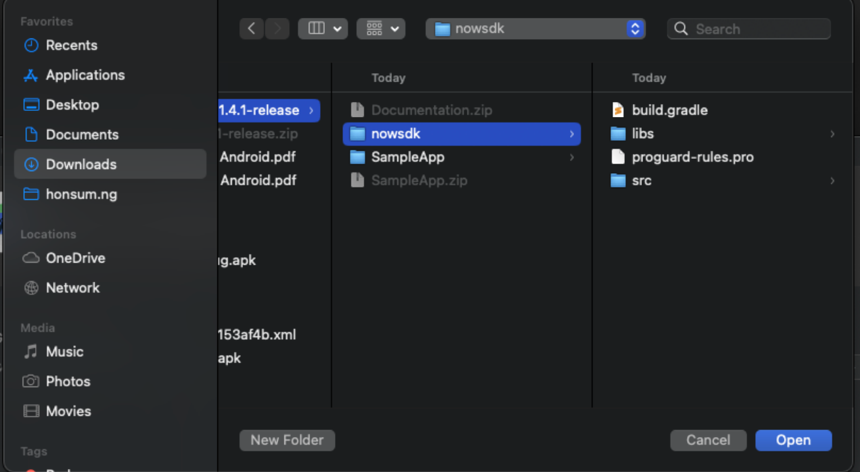
As the project is imported, the IDE will report a build error.
-
To resolve any build errors, make sure the following key-value pairs are added inside the nowsdk module’s build.gradle file.
This information defines the versions for each of the transitive dependencies of the NowSDK.
ext {
    kotlin_version = "2.1.0"
    hilt_version = "2.55"
    navigationVersion = '2.8.5'
    mapsKtxVersion = '3.4.0'
    mapsComposeVersion = '2.11.0'
    androidxCoreVersion = '1.13.1'
    recyclerViewVersion = '1.3.2'
    appCompatVersion = '1.6.1'
    constraintLayoutVersion = '2.2.0'
    lifecycleVersion = '2.8.7'
    roomRuntimeVersion = '2.6.1'
    roomRxJavaVersion = '2.6.1'
    timberVersion = '5.0.1'
    rxAndroidVersion = '3.0.2'
    rxJavaVersion = '3.1.10'
    rxKotlinVersion = '3.0.1'
    daggerVersion = '2.55'
    androidxAnnotationVersion = '1.9.1'
    materialVersion = '1.9.0'
    retrofitVersion = '2.11.0'
    okhttpVersion = '4.12.0'
    cardViewVersion = '1.0.0'
    gsonVersion = '2.11.0'
    firebaseBomVersion = '33.7.0'
    exifinterfaceVersion = '1.3.7'
    kotlinxCoroutinesVersion = '1.10.1'
    moshiVersion = '1.15.2'
    androidxBrowserVersion = '1.8.0'
    composeBomVersion = '2025.01.00'
    composeViewmodelVersion = '2.5.1'
    composeActivityVersion = '1.9.3'
    jsoupVersion= '1.18.3'
    cameraxVersion = '1.2.3'
    lottieVersion = '6.6.1'
    fragmentKtxVersion = '1.5.2'
    coroutinesCoreVersion = '1.5.1'
    coroutinesAndroidVersion = '1.5.1'
}
-
In the nowsdk module’s build.gradle file, ensure that the following section is added to include the NowSDK repositories.
rootProject.allprojects {
  repositories {
    flatDir { dirs rootProject.rootDir.path + "/nowsdk/libs" }
  }
}
-
In the app level build.gradle file, add the NowSDK as a dependency.
dependencies {
  // NowSDK
  implementation project (":nowsdk")
Once gradle syncs, you should be able to reference the NowSDK APIs.