- Mark as New
- Bookmark
- Subscribe
- Mute
- Subscribe to RSS Feed
- Permalink
- Report Inappropriate Content
08-15-2022 10:27 AM
Hi everyone,
I am configuring the employee center now, I have a list of menu items which are catalog items and each item belongs to a category.
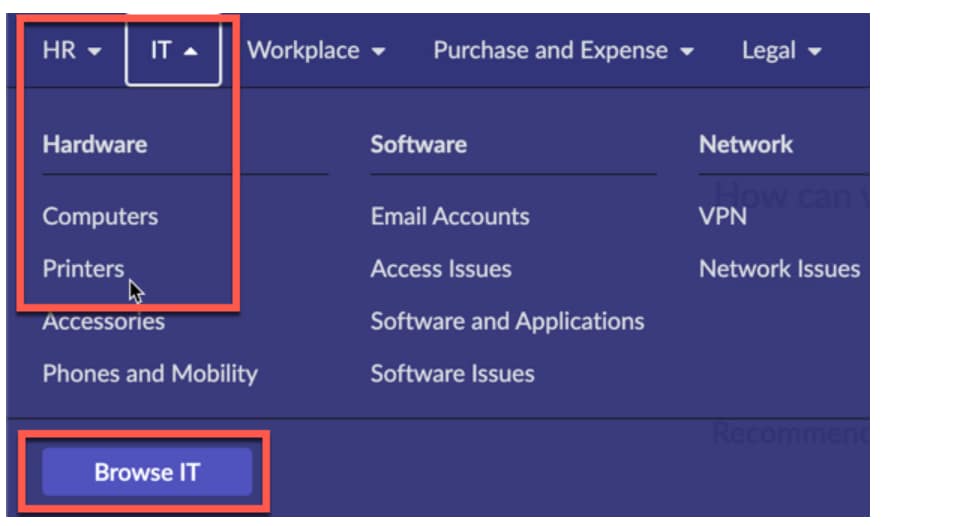
Currently, my menu looks like this

But I want the menu look like this. For example, Each item should belong to one category like Hardware, Software as image below.

What thing can I change?
Thank you so much.
Solved! Go to Solution.
- Mark as New
- Bookmark
- Subscribe
- Mute
- Subscribe to RSS Feed
- Permalink
- Report Inappropriate Content
08-21-2022 11:57 PM
Thanks everyone, my problem was that I chose the wrong theme for the portal, thats why the megamenu did not show the expected menu items.


- Mark as New
- Bookmark
- Subscribe
- Mute
- Subscribe to RSS Feed
- Permalink
- Report Inappropriate Content
08-18-2022 05:30 PM
You can assign the catalog items to the appropriate Topic from the actual Topic record (Context Taxonomy > Topics). On the Topic, from the "Connected Content" related list/tab at the bottom you can add the catalog item.
- Mark as New
- Bookmark
- Subscribe
- Mute
- Subscribe to RSS Feed
- Permalink
- Report Inappropriate Content
08-21-2022 11:57 PM
Thanks everyone, my problem was that I chose the wrong theme for the portal, thats why the megamenu did not show the expected menu items.
- Mark as New
- Bookmark
- Subscribe
- Mute
- Subscribe to RSS Feed
- Permalink
- Report Inappropriate Content
10-02-2024 03:45 AM
Can anyone let me know where can I change the CSS of the mega menu like the background color.