Shahed Shah1
Tera Guru
Options
- Subscribe to RSS Feed
- Mark as New
- Mark as Read
- Bookmark
- Subscribe
- Printer Friendly Page
- Report Inappropriate Content
03-18-2015
11:29 AM
On the web, the URL of a page plays a huge part in your user experience and the success of navigation. If your ServiceNow URL schema is constructed incorrectly you could end up sending your visitors to the wrong page, or worse: an error message. Last week I was helping a customer who was creating an Email Notification that would link back to a Service Catalog form within the usual Instance UI (the frameset). Based on the building blocks for URL creation, we were able to work out how the customer could link within the frameset.
The customer was having an issue where the URL would fail and present to the users a "Not Authorized" message. When looking into this with the customer, the issue came down to how the uri parameter was being used and how the value was being encoded.
Let's start with: https:// <instancename>.service-now.com/nav_to.do?uri= Remember that the nav_to.do page in the above URL will resolve to navpage.do, which is the frameset and ensures the requested page in the uri parameter is loaded into the main frame. To demonstrate this, let's look an example you will already be familiar with: https://<instancename>.service-now.com/nav_to.do?uri=incident_list.do%3Factive%3Dtrue When clicking on the link you will be taken to the Instance and, in the main frame, be shown the Incident list. The following URL would also achieve the same result: https://<instancename>.service-now.com/nav_to.do?uri=incident_list.do?active=true |
In many cases, the browser can be forgiving. Now, I say forgiving because a URL can get weird when you have a more complicated "sub" link. This is where I commonly see issues arise.
Key points in URL navigation:
- Everything before the first question mark (?) is familiar to everyone.
- After the question mark is a query string.
- Query strings are separated with the ampersand (&).
- The uri parameter is, essentially, expecting an encoded URL.
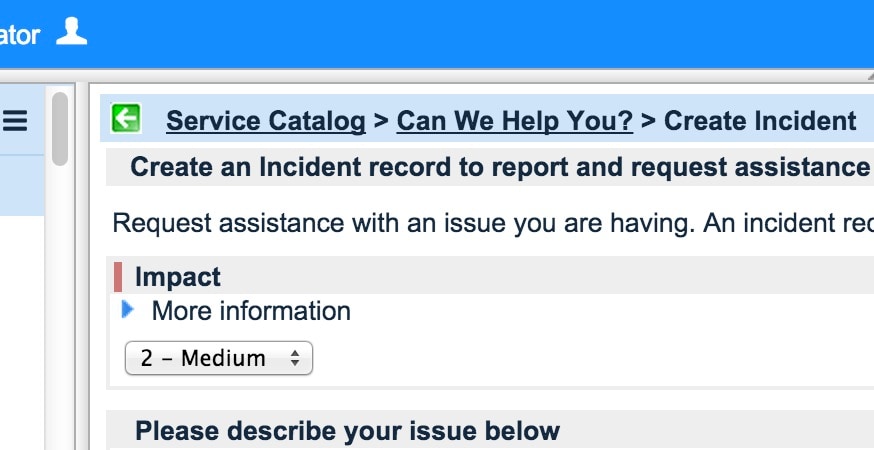
Now, let's demonstrate what was going wrong with the customer using an base system demo. Let's pick the good ol' Create Incident record producer and try opening it in a new tab. This will let us grab the respective URL.
To obtain the URL of an incident record:
Navigate to Service Catalog > Record Producer.
Go into the Create Incident record.
- Click on Try It.
- Right-click on a blank area of the page and select This Frame > Open Frame in New Tab (this is for Firefox but you can get a plugin for Chrome to do similar. I use this one).
This is what I got from a Eureka demo: https://<instancename>.service-now.com/com.glideapp.servicecatalog_cat_item_view.do?v=1&sysparm_id=3f1dd0320a0a0b99000a53f7604a2ef9&sysparm_link_parent =e15706fc0a0a0aa7007fc21e1ab70c2f&sysparm_catalog=e0d08b13c3330100c8b837659bba8fb4 &sysparm_catalog_view=catalog_default |
You will not be able to take the com.glideapp.servicecatalog_cat_item_view.do page and parameters, then place it in uri parameters. Trying to do so will result in a "Not Authorized" message.
(Pretty, isn't it?)
This is because all the ampersands (&) are being interpreted at the level of nav_to.do, when it should be interpreted at the level of the com.glideapp.servicecatalog_cat_item_view.do page. So that means we need to encode that URL into the uri parameter.
A way around this is to use the URL Encoder built into the DuckDuckGo search engine. To get the URL, just enter "url encode [url]" into the search box (of course change [url] to the URL of interest).
So:com.glideapp.servicecatalog_cat_item_view.do?v=1&sysparm_id=3f1dd0320a0a0b99000a53f7604a2ef9 &sysparm_link_parent=e15706fc0a0a0aa7007fc21e1ab70c2f&sysparm_catalog =e0d08b13c3330100c8b837659bba8fb4&sysparm_catalog_view=catalog_default Would become:com.glideapp.servicecatalog_cat_item_view.do%3Fv%3D1%26sysparm_id%3D3f1dd0320a0a0b99000a53f7604a2ef9 %26sysparm_link_parent%3De15706fc0a0a0aa7007fc21e1ab70c2f%26sysparm_catalog %3De0d08b13c3330100c8b837659bba8fb4%26sysparm_catalog_view%3Dcatalog_default The next step would be to add this to: https://<instancename>.service-now.com/nav_to.do?uri= Now when I built the whole URL, I would get:https:// <instancename>.service-now.com/nav_to.do?uri=com.glideapp.servicecatalog_cat_item_view.do%3Fv%3D1 %26sysparm_id%3D3f1dd0320a0a0b99000a53f7604a2ef9%26sysparm_link_parent %3De15706fc0a0a0aa7007fc21e1ab70c2f%26sysparm_catalog%3De0d08b13c3330100c8b837659bba8fb4 %26sysparm_catalog_view%3Dcatalog_default Trying it out now will show the Create Incident Record Producer within the Instance frameset. (Yay! ) |
This concept will also apply if you were to create a Content Page within your CMS portal that would dynamically load the content into an iFrame. Whatever you decide to call the parameter to do the deed, don't forget to encode the URL.
Another reference to use for encoding the URL is available from here: HTML URL Encoding Reference. This page hosts a table for you to look up the character of interest and will provide the encoding required.
Typical characters that are up for encoding are listed in this table:
| Character | Encoding from UTF-8 |
|---|---|
| ? | %3F |
| & | %26 |
| = | %3D |
| @ | %40 |
| % | %25 |
- 26,466 Views
13 Comments
You must be a registered user to add a comment. If you've already registered, sign in. Otherwise, register and sign in.