- Mark as New
- Bookmark
- Subscribe
- Mute
- Subscribe to RSS Feed
- Permalink
- Report Inappropriate Content
10-05-2020 04:58 AM
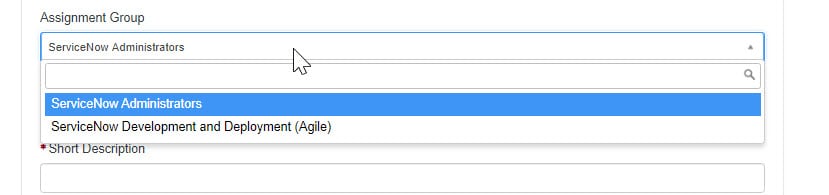
I have a reference field "Assignment Group" from the sys_user_grmember table. I have filter this from reference qual with javascript: 'user=' + current.variables.requested_by;
However, I need to set the default value with the first value available from the list? How to do this?
Can this be possible from the Default value field? Or do I need to write client script? If via client script? How? thanks.

Solved! Go to Solution.
- Labels:
-
Service Catalog


- Mark as New
- Bookmark
- Subscribe
- Mute
- Subscribe to RSS Feed
- Permalink
- Report Inappropriate Content
10-05-2020 11:08 AM
Hi Sarah - You need to write a client script to set the value i.e Client Script + GlideAjax approach. You can query the records from the table and add additional logic to filter the record with setLimit(1) to only return one record in a response.
Reference:
https://community.servicenow.com/community?id=community_blog&sys_id=f8ccee25dbd0dbc01dcaf3231f961978
- Pradeep Sharma

- Mark as New
- Bookmark
- Subscribe
- Mute
- Subscribe to RSS Feed
- Permalink
- Report Inappropriate Content
10-05-2020 04:59 AM
- Mark as New
- Bookmark
- Subscribe
- Mute
- Subscribe to RSS Feed
- Permalink
- Report Inappropriate Content
10-05-2020 05:04 AM
Include NONE is available when the variable type is a Lookup Select Box. I am using a Reference variable


- Mark as New
- Bookmark
- Subscribe
- Mute
- Subscribe to RSS Feed
- Permalink
- Report Inappropriate Content
10-05-2020 05:01 AM
Hi Sarah,
Passing it in the Default value field should work.
- Mark as New
- Bookmark
- Subscribe
- Mute
- Subscribe to RSS Feed
- Permalink
- Report Inappropriate Content
10-05-2020 05:06 AM
What does it mean? This below script did not work.
javascript:gs.getUser(current.variables.requested_by).getRecord().getDisplayValue('group');