- Mark as New
- Bookmark
- Subscribe
- Mute
- Subscribe to RSS Feed
- Permalink
- Report Inappropriate Content
04-26-2017 05:29 AM
Hello All,
I was stuck on this particular point and hope someone can point me in right direction.
I want to create a reusable widget (say a modified date picker), I would use it as a variable in multiple catalog items. Now, I'd like some options to dynamically change based on some options specified at the variable definition. (I could store them in a different table in future, but for simplicity assume that one additional field stores this information on 'item_option_new' table. My question is how can I identify which variable is being called in widget's server script?
In client controller I can get this information by using $scope.page.field.sys_id. But, I'd like to have this information at the server side so that I could provide the options from server side.
-Mandar
Solved! Go to Solution.
- Labels:
-
Service Catalog
-
Service Portal

- Mark as New
- Bookmark
- Subscribe
- Mute
- Subscribe to RSS Feed
- Permalink
- Report Inappropriate Content
05-05-2018 02:43 AM
I completely understand what you're trying to do... or so I think. I'm in the same boat.
I have a catalog item on the Service Portal to where I added a macro variable that loads a widget:

Now, when this widget loads, I want to grab the sys_id of the calling catalog item because in the Server Script, I want to query the item_option_new table to get the sys_id's of all the variables:

When the widget initially loads, it runs the Server Script and that's where I can't seem to get the sys_id of the calling catalog item... the same issue you're having.
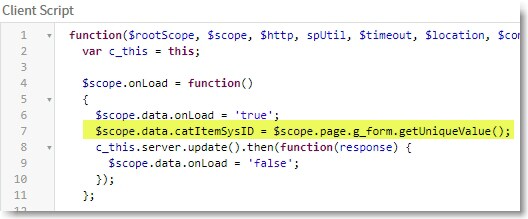
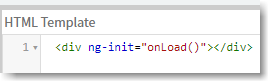
The only way that I've found do what you're trying to do is by doing this:


However, this is not the way I want to go about it. I need to grab that sys_id before any of the HTML Template code gets rendered.
I forked this into my own question in the Developer Community here (my Developer Community post)
- Mark as New
- Bookmark
- Subscribe
- Mute
- Subscribe to RSS Feed
- Permalink
- Report Inappropriate Content
05-04-2017 11:35 PM
Hey Ujjawal,
Thanks again for responding.
However, I don't want to send the data back to server, but rather want to know if there's a way to get page.field object at the server side itself. Something like options object. We set it at the server side at the beginning and then access it at client side using c.options. Since, sys_id etc are involved, I assume there must be some object that stores these details before they are accessible at client side with page.field object.
For simplicity, consider below codes
Client Side
function($scope) {
var c = this;
alert('Variable's sys id that is accessing this '+$scope.page.field.sys_id');
}
Server side
//Code for initial load
//I want to access variables's sys_id in the initial load itself. Don't want to send it back from client side.
Thanks,
Mandar

- Mark as New
- Bookmark
- Subscribe
- Mute
- Subscribe to RSS Feed
- Permalink
- Report Inappropriate Content
05-04-2017 11:49 PM
Hi Mandar,
Server side script can use fields stored in server/database. If you data onload of the widget then data must be present in database and if this is the case then you can get it from server side glide itself. But if you are providing some input on the form then you will have to send data from client to server. $scope.page.field.sys_id brings data based on the field's value present on the page and we are fetching value from browser. Infact if we change value of the field on the form then it will alert new value. It is available for browser only and not saved yet to database.
Hope this helps.
Regards
Ujjawal

- Mark as New
- Bookmark
- Subscribe
- Mute
- Subscribe to RSS Feed
- Permalink
- Report Inappropriate Content
05-04-2017 11:36 PM
Hi Mandar
Brad's answer here might help:
Get current catalog item variable name or sys_id from within widget
- Mark as New
- Bookmark
- Subscribe
- Mute
- Subscribe to RSS Feed
- Permalink
- Report Inappropriate Content
05-04-2017 11:44 PM
Hi Regina,
Thanks for the link, Again, it is pointing to accessing the page.field object at client side. I want to know how to access the same during widget's initial load at server side.
-Mandar
- Mark as New
- Bookmark
- Subscribe
- Mute
- Subscribe to RSS Feed
- Permalink
- Report Inappropriate Content
05-04-2017 11:48 PM
Oh in that case you may use GlideRecord to retrieve your table and fields/ variables within that table.