Explore the Discovery Console for OT
The ServiceNow® Discovery Console for Operational Technology (OT) provides you with enhanced features to discover your assets in the OT environment.
Discovery Console for OT Overview
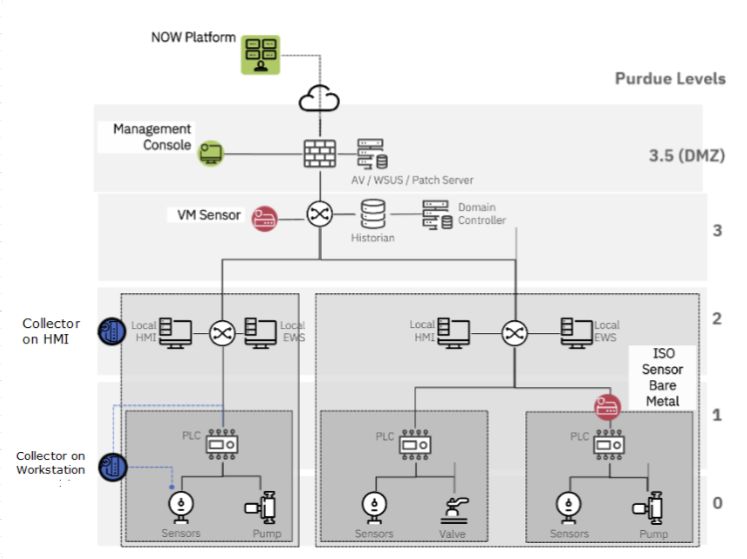
The Discovery Console for OT provides complete operational technology visibility across your entire OT environment. This awareness starts at the Human Machine Interface (HMI Purdue Reference Model Levels 2 and 3)
and goes down to the field devices (Level 0) through the Discovery Console for OT Network and Sensors. From the Discovery Console for OT you can enable and configure device management capabilities. The Discovery Console for OT and Discovery Sensor for OT work together to create a comprehensive device inventory that you can monitor and manage from a single interface.
Discovery Console for OT use and benefits
Some of the uses and benefits of the Discovery Console for OT are as follows.
- Uses
- You can use the Console as a configuration manager for your OT devices.
- Configure schedules, manage sites, networks zone, configure discovery settings, review the asset data and provide access to additional users.
- You can manage and monitor several Discovery Sensor for OT and OT Discovery Collector devices.
- Benefits
- Act as a single source of truth for all OT Devices discovered within the Sites.
- The Console manages OT assets and provides visibility to OT operators.
Accessing the Discovery Console for OT
Access to the Discovery Console for OT requires these steps:
注:
Before you can use the Console, you must have a license. Request a Console license from your ServiceNow account representative.
- Have an active ServiceNow® instance.
- Go to the ServiceNow Store, acquire and install the Service Graph Connector (SGC) for ServiceNow® OT Discovery, and navigate to the SGC Guided Setup page.
- The first step of the Guided Setup is to click the link to the Download & Deploy for the OT Discovery components.
- From there, download the installation packages for the Console, Sensor, and Collector, as desired.注:It is recommended that you install the components in this order: Console, then Sensor, and then Collector.
- The Console installer packages must be installed on a virtual machine with a Linux distributed OS.注:For systems on closed networks, you can download and install containerized versions of the Discovery Console for OT and the OT Discovery Collector from the Download page. These packages include all required components and do not require internet access for installation. The OT Discovery Collector requires a Windows or Linux host. Online documentation is available via links on the Download page.