Background jobs in vulnerability response products are designed to run for long periods of time to perform multiple processes on your records. The background job processors are shipped with the base system that run via the
system user and create records in the global domain.
始める前に
Role required: admin
手順
-
Navigate to .
-
Create a domain.
For more information on how to create a domain, see Create a domain.
For every domain created, create a user and assign the user to the domain. Suppose this user as a run_as placeholder for the domain. It’s the equivalent of VR.System user in the global domain. This user needs access
to vulnerability data.
-
Change the run_as of the scheduled jobs Scheduled Background Job Manager, and Close the parent background job.
If you have multiple domains created, duplicate this job and change run_as user accordingly. You may also want to keep a copy of the preceding jobs with the run_as user of the global domain
in an inactive mode.
Ten processor jobs (for example, Background job processor
10) are shipped with the base system. Change the run as of these jobs to the domain-separated user. If multiple domains are present, then two jobs per domain are sufficient, but these jobs can also be
duplicated if necessary. Keep two processor jobs with run_as user in the global domain.
Starting from v20.0 of Vulnerability Response, the following script changes are shipped with the base system.
-
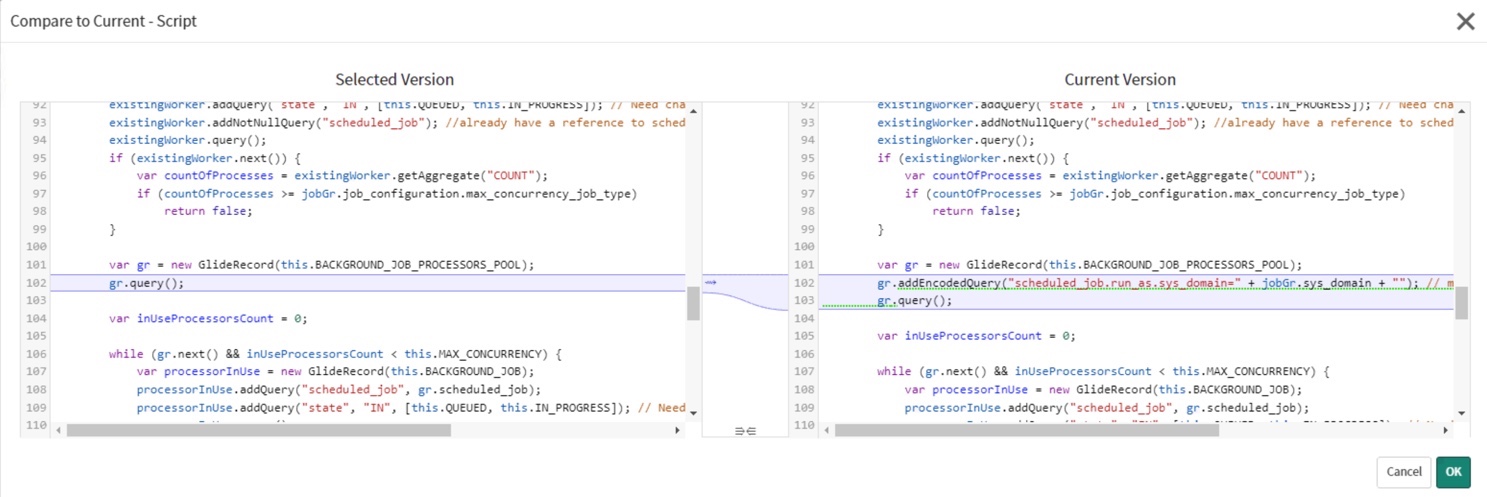
Modify the script include BackgroundJobManager, and add the following line as shown in the following image.
gr.addEncodedQuery("scheduled_job.run_as.sys_domain=" + jobGr.sys_domain + "");
注: Trigger the on-demand reapply of any rules from the correct domain.