Interaction records in Workspace
Using an interaction record, agents can create or reference customer information from a customer contact. Agents can then decide if the conversation is an incident, case, or request.
An interaction represents a request for assistance made through a chat, phone call, or walk-up.
Interactions can be routed to queues for assignment or assigned to agents directly. Support
agents can create cases, requests, or incidents from the interaction. Interactions can also
be used to capture one-and-done type requests where an agent might not want to create associated
tasks.
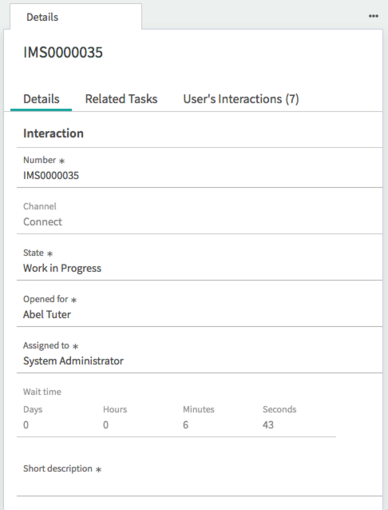
While you are on an interaction, tasks that are viewed or created under the interaction
are automatically logged on the Interaction Related tasks.
| Feature | Description |
|---|---|
| Details, Related Tasks, User's Interactions forms | Details tab that shows detailed information from the interaction record. Related Tasks show tasks related to the interaction in the form pane, for example, a new incident. User's Interactions tab shows all interactions related to specific users. |
| Number | Number is associated to each customer interaction. |
| Type | Logs the type of channel communication, such as chat, phone, walk-up, or
messaging. Note: Phone is an available type of channel communication
when the OpenFrame plugin (com.sn_openframe) is activated. |
| State | State of the interaction record:
|
| State reason | Reason for the current state of the interaction record:
|
| Opened for | Customer who initiates or receives the communication. |
| Duration | Tracks the amount of time an agent spends working on an interaction. |
| Assigned to | Agent the interaction record is assigned to. |
| Wait time | Time it takes to initially respond to the customer. |
| Short Description | Short description of the interaction. Note: The short description field is empty by
default, but it cannot be empty when the record is closed, saved, or associated to a
related task. Populate the short description and then close, save, or associate the record,
or you cannot archive the record. |
Associating user profiles on messaging interactions
When a requester sends a message, the system checks whether the identifier matches an existing
channel user profile. Channel user profiles are used to track the identities of conversation
participants using an identifier associated with the source of the message. For SMS messages,
the identifier is the phone number from which the message was sent.
| If there is a matching channel user profile |
|
| If there is no matching channel user profile |
|