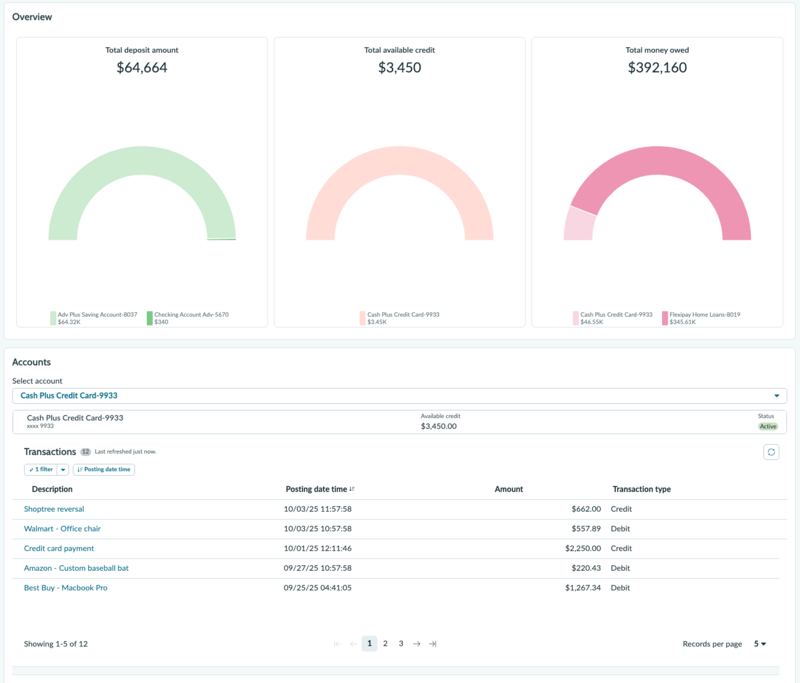
Review a customer's financial summary, account holdings, and account details in the Customer 360 page to understand the customer's overall position with the bank before or during an interaction.
Before you begin
Role required: sn_fso_csr.business_agent, sn_fso_csr.personal_agent
Procedure
-
Open a consumer or account record.
-
Review the three financial metric cards to assess the customer's current financial position:
- Total deposit: The combined balance across the customer's savings accounts, checking accounts, and fixed-term deposits.
- Total available credit: The remaining available balance across credit cards, overdraft facilities, and lines of credit.
- Total money owed: The total outstanding balance the customer owes the bank, including unpaid loans and credit card balances.
If the value of a metric is zero, the card displays $0. If no relevant product exists for the customer, the card displays No account available.
-
In the Accounts section, from the Select account list, select an account to review that customer's account.
Each account card shows the product name, masked account number (last four digits visible), current balance, and account status.
-
Review the transactions for the selected account.
The transactions are presented in a list, showing the description, posting date time, amount, and transaction type.