次世代 Fortinet ネットワークファイアウォール SNMP ベースのディスカバリー
ディスカバリーとサービスマッピングパターン アプリケーションは、次世代の Fortinet ネットワークファイアウォールパターンを使用して、一連の SNMP コールを通じてFortinetファイアウォールを検索します。 これらのリソースを検出するには、ServiceNow Storeから最新バージョンの ディスカバリーとサービスマッピングパターン アプリケーションに更新する必要がある場合があります。
次世代の Fortinet Network ファイアウォールパターンは、一連の SNMP コールを使用して Fortinet ファイアウォールを検索します。ディスカバリー は、このパターンを使用して水平ディスカバリーを実行します。
注:
REST ベースの Fortinet ファイアウォールディスカバリー方法のみが FortiGate VDOM を検索します。SNMP ベースの Fortinet ファイアウォールディスカバリー方法では検出されません。 REST ベースの Fortinet ファイアウォールと FortiGate 仮想ドメイン (VDOM) ディスカバリーの詳細については、「Fortinet ファイアウォールと FortiGate VDOM REST ベースのディスカバリー」を参照してください。
ストアでアプリを要求する
ServiceNow Storeにアクセスして、利用可能なすべてのアプリを表示し、ストアに要求を送信する方法を確認してください。リリースされたすべてのアプリのリリースメモ情報については、「ServiceNow Store バージョンの履歴リリースノート」を参照してください。
検出可能な Fortinet ファイアウォールとそのバージョンについては、「ITOM ヴィジビリティ により検出された製品に関する詳細情報」を参照してください。
必須条件
- アプリケーションが最新の状態であることを確認する
-
- ディスカバリーとサービスマッピングパターン
- CMDB CI クラスモデル
- SNMP アクセスを確認する
- Fortinet ファイアウォールデバイスに SNMP アクセスできることを確認します。
- SNMP 認証情報を構成する
- ServiceNow インスタンスで、SNMP 認証情報を構成します。詳細については、「」を参照してください。
- SNMP システム OID レコードを ServiceNow インスタンスに追加する
- Fortinet デバイスの SNMP システム OID レコードを ServiceNow インスタンスに追加します。次を更新します。
- 分類子:Fortinet ファイアウォール
- クラス:Fortinet ファイアウォールデバイス
- 水平ディスカバリーを実行する
- 詳細については、「ネットワーク内でのディスカバリーの実行」を参照してください。
水平ディスカバリー中にディスカバリーによって収集されるデータ
ディスカバリーは、次世代の Fortinet Network ファイアウォールパターンの実行時に、CMDBにデータを入力します。
| フィールド | 説明 |
|---|---|
| 名前 [name] | ホスト名。 |
| 完全修飾ドメイン名 [fqdn] | 完全修飾ドメイン名。 |
| IP アドレス [ip_address] | IP アドレス。 |
| メーカー [manufacturer] | デバイスのメーカー。 |
| 説明 [short_description] | Fortinet ファイアウォールクラスターの簡単な説明。 |
| モデル番号 [model_number] | デバイスのモデル番号。 |
| ハードウェアオペレーティングシステム [hardware_os] | ハードウェアで実行されている OS。 |
| ハードウェア OS バージョン [hardware_os_version] | ハードウェアで実行されている OS バージョン。 |
| フィールド | 説明 |
|---|---|
| 名前 [name] | ホスト名。 |
| シリアル番号 [serial_number] | デバイスのシリアル番号。 |
| 完全修飾ドメイン名 [fqdn] | 完全修飾ドメイン名。 |
| 運用ステータス [operational_status] | デバイスの状態がアクティブかどうかを示します。 |
| IP アドレス [ip_address] | IP アドレス。 |
| メーカー [manufacturer] | デバイスのメーカー。 |
| 説明 [short_description] | デバイスの簡単な説明。 |
| モデル番号 [model_number] | デバイスのモデル番号。 |
| ファームウェア [firmware_version] | ファームウェアバージョン。 |
| ハードウェアオペレーティングシステム [hardware_os] | ハードウェアで実行されている OS。 |
| ハードウェア OS バージョン [hardware_os_version] | ハードウェアで実行されている OS バージョン。 |
| フィールド | 説明 |
|---|---|
| IP アドレス [ip_address] | Fortinet ファイアウォールの IP アドレス。 |
| ネットマスク [netmask] | Fortinet ファイアウォールのネットマスク。 |
| フィールド | 説明 |
|---|---|
| IP アドレス [ip_address] | ネットワークアダプターの IP アドレス。 |
| ネットマスク [netmask] | ネットワークアダプターのネットマスク。 |
| エイリアス [alias] | ユーザーがアサインしたネットワークアダプターの名前。 |
| MAC アドレス [mac_address] | ネットワークアダプターの MAC アドレス。 |
| 名前 [name] | ネットワークアダプターの名前。 |
| フィールド | 説明 |
|---|---|
| 名前 [name] | ドメイン名システムの名前 (DNS)。 |
| IP アドレス [ip_address] | DNS の IP アドレス。 |
Fortinet ファイアウォールデバイス CI 上のこの依存関係ビューマップには、属する Fortinet ファイアウォールクラスターが表示されます。
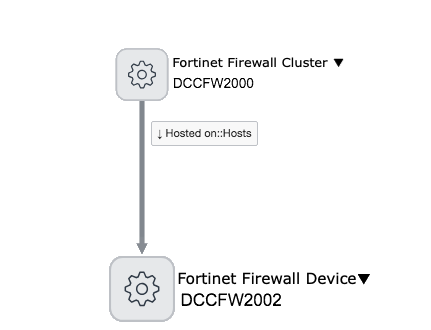
CI 関係
次の関係は、Fortinet ファイアウォールディスカバリーをサポートするために作成されます。
| CI | 関係 | CI |
|---|---|---|
| Fortinet ファイアウォールクラスター [cmdb_ci_firewall_cluster_fortinet] | 拡張元 | ファイアウォールクラスター [cmdb_ci_firewall_cluster] |
| Fortinet ファイアウォールクラスター [cmdb_ci_firewall_cluster_fortinet] | Hosted on::Hosts | Fortinet ファイアウォールデバイス [cmdb_ci_firewall_device_fortinet] |
| Fortinet ファイアウォールデバイス [cmdb_ci_firewall_device_fortinet] | 拡張元 | ファイアウォールデバイス [cmdb_ci_firewall_device] |
| Fortinet ファイアウォールデバイス [cmdb_ci_firewall_device_fortinet] | Owns::Owned by | IP アドレス [cmdb_ci_ip_address] |
| Fortinet ファイアウォールデバイス [cmdb_ci_firewall_device_fortinet] | Owns::Owned by | ネットワークアダプタ [cmdb_ci_network_adapter] |
| Fortinet ファイアウォールデバイス [cmdb_ci_firewall_device_fortinet] | Uses::Used by | ルーターインターフェイス [dscy_router_interface] |
| IP アドレス [cmdb_ci_ip_address] | 参照 | ネットワークアダプタ [cmdb_ci_network_adapter] |
| ネットワークアダプタ [cmdb_ci_network_adapter] | Owns::Owned by | IP アドレス [cmdb_ci_ip_address] |
| ネットワークアダプタ [cmdb_ci_network_adapter] | 参照 | Fortinet ファイアウォールデバイス [cmdb_ci_firewall_device_fortinet] |
| ルーターインターフェイス [dscy_router_interface] | 参照 | Fortinet ファイアウォールデバイス [cmdb_ci_firewall_device_fortinet] |
| シリアル番号 [cmdb_serial_number] | 参照 | Fortinet ファイアウォールデバイス [cmdb_ci_firewall_device_fortinet] |