Create a function field to be able to group and stack a report by the results of the
field's calculation.
시작하기 전에
Role required: admin, function_field_admin
Each function field requires a label, a return type, and a definition. The definition
consists of the operation and one or more fields that the operation is performed
on.
주: It isn’t possible to change the label or the return type after you save a function field. If necessary, deactivate the function field and start again.
프로시저
-
Navigate to sys_reports.list and select New.
-
Select the report that you want to add a function field to.
When you configure a function field on a table, it is available anywhere you use the table on the ServiceNow AI Platform, including any report on the same table. For example, a function field that calculates the age of open incidents is available for all reports on the incident table.
-
Open the Configure tab and select Configure function field.
- 옵션:
Enter the field name in the search bar to see if someone has already created
the function field.
Hover over the search results to see the function definition.
-
Select Create.
There can be a maximum of 20 active function fields on the table the report is based on. If the table already has 20 function fields, a creator of one of the fields or a user with the admin role must deactivate or delete
one.
-
Specify the Label.
The label is the name users can see
when they group or stack data in a report.
-
Select the Return type.
The return type is the kind of information the function produces. For example,
the
datediff() function returns a Duration type because it
calculates the duration between two
dates.
주: You do not see
a message if your return type is not a logical result of the
function.
-
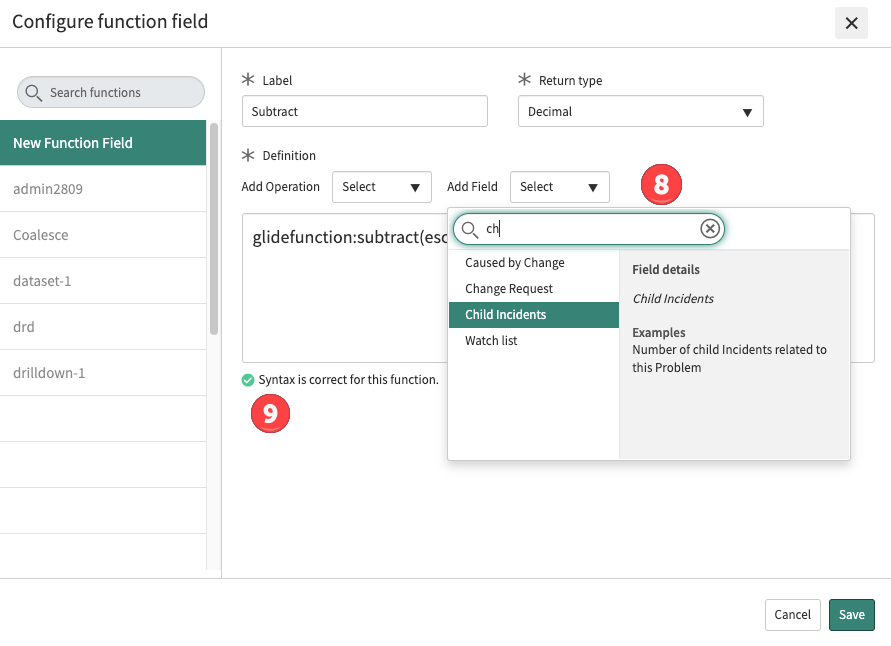
Select the Operation.
The
Syntax text box shows the name of the
function preceded by
glidefunction:.

-
Select the fields that the function operates on.
Some functions require only one field; some require two or three fields. See
Report on function fields. Make sure that you separate the fields with commas.
-
When the syntax is correct, you can save the function field.
When the syntax is incorrect, you see the message:
Syntax error:
Invalid expression. You may also see other messages.
결과
Configured function fields appear in the Group by and Additional group by lists after you save the report.
Use the created function field it in your report or data visualization
configuration. For information on using function fields elsewhere on the ServiceNow AI Platform, see Function field.