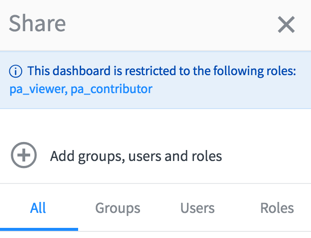
Specify additional roles required to access the dashboard when you share a dashboard with specified users, groups, and roles. Only users who the dashboard has been shared with and who have one of the
specified roles are able to access the dashboard.
Avant de commencer
Role required: pa_admin, pa_power_user, admin, or be the dashboard owner. Other
users who edit the dashboard can see this field but cannot modify it.Remarque : Restricting
access to a dashboard to specific roles is not the same as sharing the dashboard
with those roles. You must share the dashboard before you can restrict access to
specified roles. The best practice, however, is to use the
Share panel to share with users, groups, and roles.
Restrict to roles is not recommended.
The Restrict to
roles field is available only after responsive dashboards have been
enabled. If responsive dashboards have been enabled and then disabled, the
Restrict to roles field remains available but does not
affect dashboard access.
Pourquoi et quand exécuter cette tâche
When dashboards are migrated between releases, this field is automatically
populated with the pa_viewer and pa_contributor roles to ensure that only users who
could access the dashboard before migration can access it afterward.
Procédure
-
Navigate to the dashboard to restrict to specific roles.
-
Click the context menu (
 ) and select Dashboard properties.
-
In the Restrict to roles field, specify the additional
roles required to access the dashboard.
Users with any of the specified roles can access the dashboard only if it has been shared with them first from the
Share panel. For more information, see
Share a responsive dashboard.
Résultats
Only users with the restricted role are able to view the
dashboard. A message on the Sharing panel indicates which roles have access. Click the
roles in this message to view the properties of the dashboard.