Conditional filters and operators for indicators and breakdowns
Conditional filters for indicator data cascade from indicator and breakdown sources up to data visualizations. Where conditions are applied can affect data collection efficiency. Some condition operators are only available at some levels, or in some conditions.
Conditional filters on indicators and indicator sources
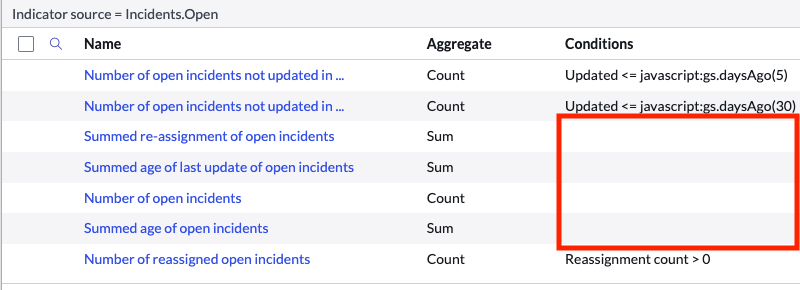
Conditional filters can be applied to both automated indicators and indicator sources. In general, conditions that are applied to all indicators with the same source should be applied on the indicator source. To verify that your
conditions are well designed, list the indicators for an indicator source and include the Conditions field in the view. You should have at least one indicator that only uses the conditions on the indicator source. Otherwise, your
indicator source is probably collecting unused data. In this case, consider moving common conditions from the indicators to the indicator source, or splitting the indicator source.
Warning:
To avoid a data collection job completing with errors, follow these limitations:
- Do not add a condition that references Roles to an indicator. You can reference the Roles table only in an indicator source.
- If you define conditions that refer only to dot-walked fields, you must associate at least one breakdown with the indicator.
In general, try to avoid dot-walking to sys_id or the display value of a table, as doing so creates unnecessary table joins.
Unsupported operators on indicator conditions
The following operators are not supported on indicators. You can use these operators on the indicator source conditions instead:
- keywords
- greater than field
- less than field
- greater than or is field
- less than or is field
"Is one of" and "Is (Dynamic)" operators on breakdown conditions in data visualizations
When you select an indicator data source for a data visualization, you have the option to filter the scores by breakdown element.
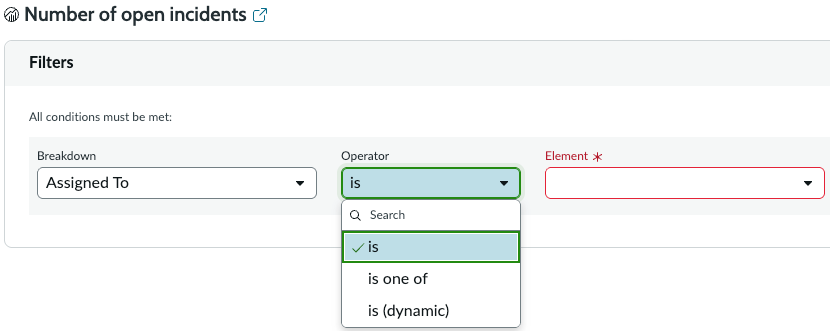
The availability of the "is one of" and "is (dynamic)" operators depends on how you configure the indicator. The indicator must support multi-element aggregates. The required configuration settings follow:
- is one of
-
- The aggregation method must not be AVG or COUNT DISTINCT. This requirement applies to automated indicators including the contributing indicators of formula indicators.
- If the indicator is a formula indicator, the Allow aggregation of multiple breakdown element scores option must be on.
- is (dynamic)
-
- The aggregation method must not be AVG or COUNT DISTINCT. This requirement applies to automated indicators including the contributing indicators of formula indicators.
- The field in the breakdown source must be a reference field.
- An elements filter must be defined for the breakdown source, and this elements filter must have a dynamic conditional filter. For an example, see the Me elements filter on an instance. For more information, see Element filters.
- If the indicator is a formula indicator, the Allow aggregation of multiple breakdown element scores option must be on.