Interaction records in Workspace
Summarize
Summarized using AI
This content was generated using new OpenAI-powered functionality. Results are provided on an as is basis and are not guaranteed to be accurate or complete.
Summary of Interaction records in Workspace
Interaction records in Workspace enable support agents to efficiently manage customer communications received through chat, phone calls, walk-ups, or messaging channels. These records help agents capture customer requests, decide whether they should be handled as incidents, cases, or requests, and route or assign interactions to appropriate queues or agents. This streamlined approach supports both complex issue tracking and simple, one-time requests without creating additional tasks.
Show less
Key Features
- Interaction Record Details: Includes tabs such as Details (showing core interaction information), Related Tasks (displaying tasks like incidents linked to the interaction), and User's Interactions (listing all interactions for a specific user).
- Communication Type Tracking: Logs the channel type—chat, phone (requires OpenFrame plugin), walk-up, or messaging—used for the interaction.
- State and State Reason: Tracks the interaction’s lifecycle status (e.g., New, Work in Progress, Closed) and reasons for current states, such as waiting on the customer or internal delays.
- Assignment and Timing: Records the agent assigned, the wait time for initial response, and the duration the agent spends working on the interaction.
- Short Description Requirement: The interaction must have a populated short description before closing, saving, or associating it with tasks, ensuring clear summarization of the issue.
- User Profile Association for Messaging: The system automatically links incoming messages to existing channel user profiles based on identifiers (e.g., phone numbers for SMS). If no profile exists, a new profile and interaction record are created. When identifiers match existing users, relevant fields in the interaction and user profile are populated accordingly.
- Automatic Logging of Related Tasks: Tasks viewed or created during an interaction are logged under the interaction’s Related Tasks, providing full context and traceability.
Practical Benefits for ServiceNow Customers
- Enables agents to quickly capture and categorize customer requests from multiple communication channels in one unified interface.
- Improves case routing and assignment efficiency, helping to reduce response and resolution times.
- Supports both complex multi-task resolutions and simple, one-off customer requests without extra overhead.
- Ensures comprehensive tracking of all related customer interactions and associated tasks for better visibility and reporting.
- Facilitates seamless user identification and profile management to maintain accurate customer records and interaction histories.
Using an interaction record, agents can create or reference customer information from a customer contact. Agents can then decide if the conversation is an incident, case, or request.
An interaction represents a request for assistance made through a chat, phone call, or walk-up.
Interactions can be routed to queues for assignment or assigned to agents directly. Support
agents can create cases, requests, or incidents from the interaction. Interactions can also
be used to capture one-and-done type requests where an agent might not want to create associated
tasks.
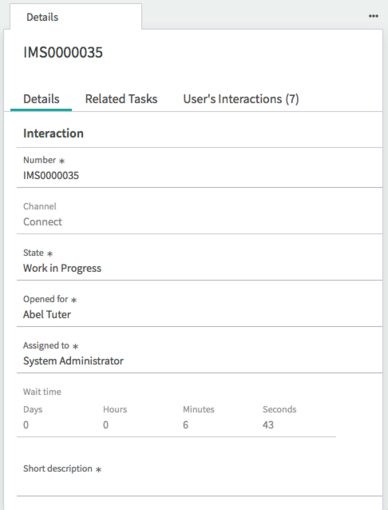
While you are on an interaction, tasks that are viewed or created under the interaction
are automatically logged on the Interaction Related tasks.
| Feature | Description |
|---|---|
| Details, Related Tasks, User's Interactions forms | Details tab that shows detailed information from the interaction record. Related Tasks show tasks related to the interaction in the form pane, for example, a new incident. User's Interactions tab shows all interactions related to specific users. |
| Number | Number is associated to each customer interaction. |
| Type | Logs the type of channel communication, such as chat, phone, walk-up, or
messaging. Note: Phone is an available type of channel communication
when the OpenFrame plugin (com.sn_openframe) is activated. |
| State | State of the interaction record:
|
| State reason | Reason for the current state of the interaction record:
|
| Opened for | Customer who initiates or receives the communication. |
| Duration | Tracks the amount of time an agent spends working on an interaction. |
| Assigned to | Agent the interaction record is assigned to. |
| Wait time | Time it takes to initially respond to the customer. |
| Short Description | Short description of the interaction. Note: The short description field is empty by
default, but it cannot be empty when the record is closed, saved, or associated to a
related task. Populate the short description and then close, save, or associate the record,
or you cannot archive the record. |
Associating user profiles on messaging interactions
When a requester sends a message, the system checks whether the identifier matches an existing
channel user profile. Channel user profiles are used to track the identities of conversation
participants using an identifier associated with the source of the message. For SMS messages,
the identifier is the phone number from which the message was sent.
| If there is a matching channel user profile |
|
| If there is no matching channel user profile |
|