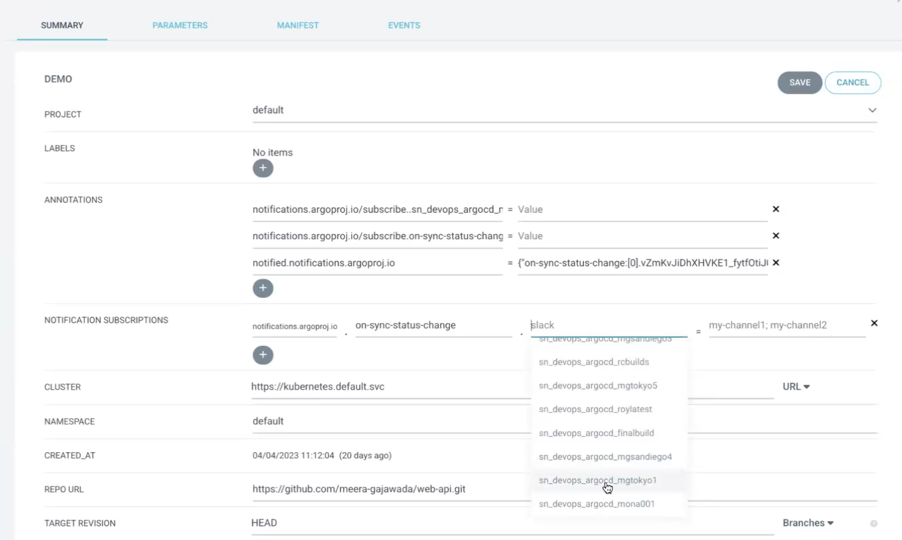
Configurez les webhooks dans Argo CD pour envoyer des notifications de synchronisation à l’application DevOps Change Velocity.
Avant de commencer
Rôle requis : Argo CD admin
Pourquoi et quand exécuter cette tâche
L’abonnement aux événements de l’application Argo CD peut être défini à l’aide de l’annotation notifications.argoproj.io/subscribe.<trigger>.<service> : <destinataire> .
Procédure
-
Dans Argo CD, mettez à jour la ConfigMap : argocd-notifications-cm.yaml pour configurer les notifications qui sont envoyées à Changements de vélocité DevOps.
apiVersion: v1
kind: configMap
metadata:
annotations:
name: argocd-notifications-cm
namespace: default
data:
context:|
   argocdUrl: "https://<argocdURL>"
service.webhook.sn_devops_argocd: |
   url: https://<instance>.service-now.com/api/sn_devops/v2/devops/tool/orchestration?toolId=<toolId>
   basicAuth: #optional username password
     username: ""
     password: ""
template.app-sync-succeeded: |
   webhook:
     sn_devops_argocd:
       method: POST
       body: |
         {
         "titleLink" : "http://<argocdURL>/applications/{{.app.metadata.name}}",
         "syncStatus" : "{{.app.status.sync.status}}",
         "repo" : "{{.app.spec.source.repoURL}}",
         "revision": "{{.app.status.sync.revision}}",
         "path": "/repos/{{call .repo.FullNameByRepoURL .app.spec.source.repoURL}}/statuses/{{.app.status.operationState.operation.sync.revision}}",
         "commitAuthor" : "{{(call .repo.GetCommitMetadata .app.status.sync.revision).Author}}",
         "commitMessage" : "{{(call .repo.GetCommitMetadata .app.status.sync.revision).Message}}",
         "commitTags" : "{{(call .repo.GetCommitMetadata .app.status.sync.revision).Tags}}",
         "startedAt" : "{{.app.status.operationState.startedAt}}",
         "finishedAt" : "{{.app.status.operationState.finishedAt}}",
         "message": "{{.app.metadata.name}} app is synced"
         }
trigger.on-sync-status-unknown: |
   - description: Application status is 'Unknown'
     send:
     - app-sync-status-unknown
     when: app.status.sync.status == 'Unknown'
trigger.on-sync-succeeded: |
   - description: Application syncing has succeeded
     send:
     - app-sync-succeeded
     when: app.status.operationState.phase in ['Succeeded']
subscriptions: |
   - recipients:
     - sn_devops_argocd
     triggers:
     - on-sync-succeeded
     - on-sync-status-unknown
-
Ouvrez l’application Argo CD pour laquelle vous configurez des webhooks.
-
Accédez au résumé > DÉTAILS DE L’APPLICATION
-
Ajoutez l’annotation notifications.argoproj.io/subscribe.<trigger>.<service> : <recipient> avec la condition de déclenchement pour synchroniser l’état du changement pour votre instance.
Par exemple,
notifications.argoproj.io/subscribe.on-sync-succeeded.sn_devops_argocd.