View dependent application services in classicService Mapping
릴리스 버전: Australia
업데이트 날짜 2026년 03월 12일
소요 시간: 1분
Check which application services depend on an application service and open maps for
dependent application services.
시작하기 전에
Roles required: service_mapping_user
이 태스크 정보
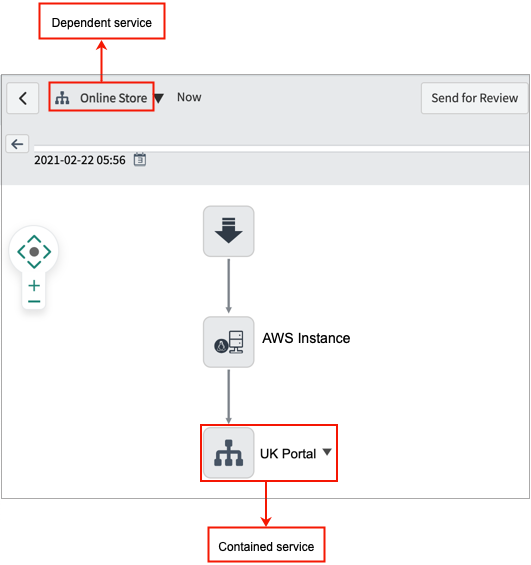
The service that contains a reference to another service instance, becomes a dependent service. The service that you include as a reference is a contained service.그림 1. Dependent service map with a reference to a contained application
service
프로시저
Open the service instance map.
Navigate to All > CSDM > Manage Technology Management Services > Service Instance.
Select the needed service instance.
On the service instance page, select View Map.
Right-click the entry point and select Show dependent
services.
The pop-up window displays the links to all dependent services for this
application service.
Select the link for the dependent service whose map you want to view.
The map window shows the map for the dependent service you selected.