The multi-table data generator enables you to create synthetic test data across multiple related ServiceNow tables in a single run. It automatically maintains referential integrity between tables and generates semantically
consistent data based on scenarios you define.
Before you begin
Role required: sn_data_kit.admin
Procedure
-
Navigate to .
-
From the Synthetic datasets tab, selectGenerate dataset.
-
Select Multi-table data generator.
-
Configure the dataset.
-
Name the dataset.
-
Enter the industry or department the data is being generated for.
-
Select Continue.
-
Select the tables and columns.
-
Select next.
-
Configure the tables.
For each selected table, fill in the form fields.
Table 1. Selected table form fields
| Field |
Description |
| Data type |
Select Transaction for records that change over time. Select Master for reference data that rarely changes. |
| Generation method |
Synthetic generates new records. Existing pulls records already in the system. Use Existing for tables where you want to reference real users rather than create new ones. |
| Filter conditions |
Optional. Narrows the existing records to pull from. For example, active = true or department = IT. |
| Record count |
The number of records to generate for this table. The system supports up to 15 tables and 100 records per table per run. |
-
Select next.
-
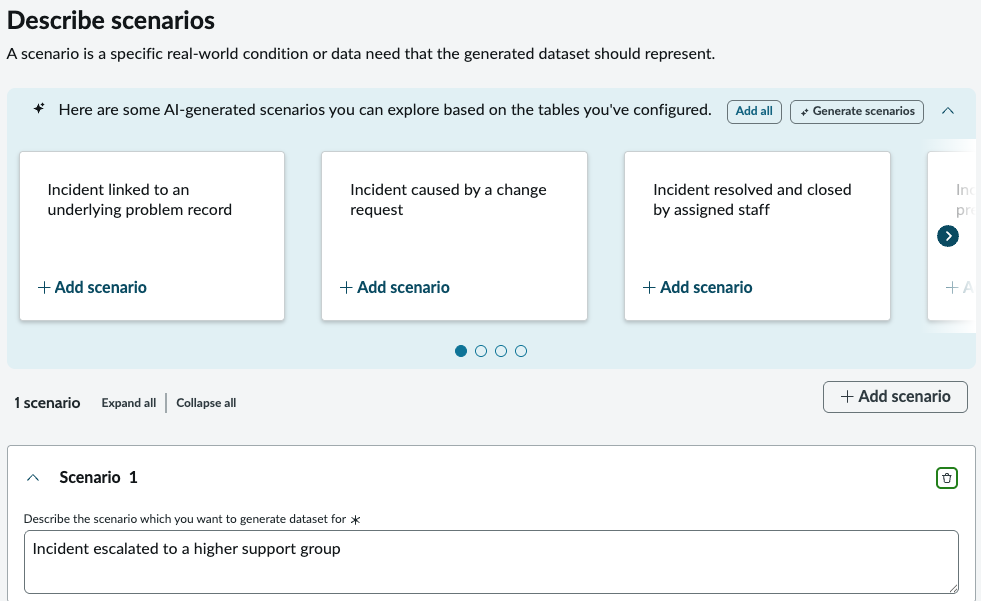
Define scenarios.
Scenarios guide the content of the generated data. The system generates records that are semantically consistent with the scenario you describe across all related tables.
-
Select next.
-
Select Generate preview.
-
Select Review summary.
-
Select Start generation.
-
Select Start.