Joignez un Knowledge article à un incident pour résoudre rapidement les problèmes en suivant les étapes de dépannage détaillées et les autres informations détaillées de l’article.
Avant de commencer
Rôle requis : aucun
Pourquoi et quand exécuter cette tâche
Procédure
-
Accédez à la .
-
Modifiez un enregistrement d’incident actif.
-
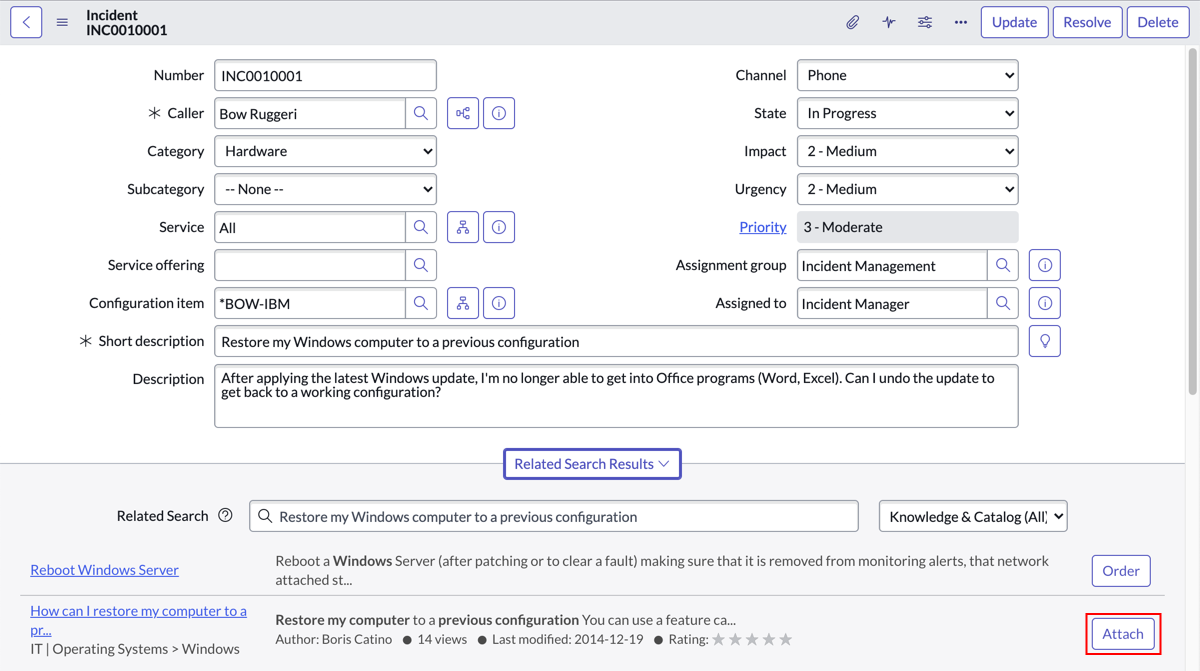
Sélectionnez les résultats de recherche connexes.
Les résultats de recherche s’affichent dans le volet Résultats de recherche connexes.
- Facultatif :
Pour afficher uniquement les résultats de recherche d’articles de la base de connaissances, ouvrez le sélecteur de source et sélectionnez Articles de la base de connaissances.
-
Sélectionnez Joindre dans les résultats de la recherche de l’article Knowledge que vous souhaitez joindre à l’enregistrement d’incident.
Une note sur l’article est copiée ou ajoutée au champ
Commentaires supplémentaires (visibles par le
Knowledge client) de l’enregistrement d’incident. Pour définir un champ de destination différent sur l’enregistrement d’incident, reportez-vous à la section
Spécifier le champ pour les liens d’articles joints Knowledge.
Remarque : Les pièces jointes de l’article sélectionné Knowledge ne sont pas jointes à l’enregistrement d’incident.
-
Pour ajouter la note au flux d’activité, sélectionnez Publier.
Vous pouvez également sélectionner et maintenir enfoncé (ou cliquer avec le bouton droit de la souris) l’en-tête du formulaire, puis sélectionner Enregistrer.
Résultats
Les détails de l’article sélectionné Knowledge s’affichent dans le champ désigné.