Spend analytics
Summarize
Summarized using AI
This content was generated using new OpenAI-powered functionality. Results are provided on an as is basis and are not guaranteed to be accurate or complete.
Summary of Spend Analytics
The Spend Analytics page provides visibility into your cloud costs by displaying spending across cloud, Kubernetes, and shared resources over a specified time range or cost type. Users with theinsightsownerrole will only see accounts assigned to them in the filters and data.
Show less
Key Features
- Cloud Spend Analytics: Analyze current spending on cloud resources, group results by provider, purchase option, region, service account, service category, cloud service, resource group, or tag category. Filter results using various parameters including provider and region, and sort by time range.
- Kubernetes Spend Analytics: Examine Kubernetes spending by cluster or namespace, with options to view actual or amortized costs. Sorting and filtering capabilities similar to cloud spend analytics are available.
- Shared Cost Analytics: Understand spending on shared resources, group and filter results by similar parameters as the previous analytics. View both direct and shared costs over time.
Key Outcomes
By utilizing the Spend Analytics page, customers can effectively monitor and manage their cloud spending, identify cost drivers, and optimize resource allocation. This visibility is crucial for financial planning and ensuring efficient use of cloud resources.
The Spend analytics page helps you gain visibility to your cloud costs by displaying your cloud, Kubernetes, and shared resources spend over a time range or a cost type that you specify.
Important:
If you have the insights_owner role, only the accounts that are assigned to you appear in the filters and data.
Use the Spend analytics page to view the following:
- Cloud spend analytics
- Kubernetes spend analytics
- Shared cost analytics
Note:
You can't view the spend of your resources for nested tag values. For example, {"name":"test","created-by":"xyz","prod":"false","shared_resource":"false"}.
Cloud spend analytics
Select the Cloud spend analytics tab to do the following tasks: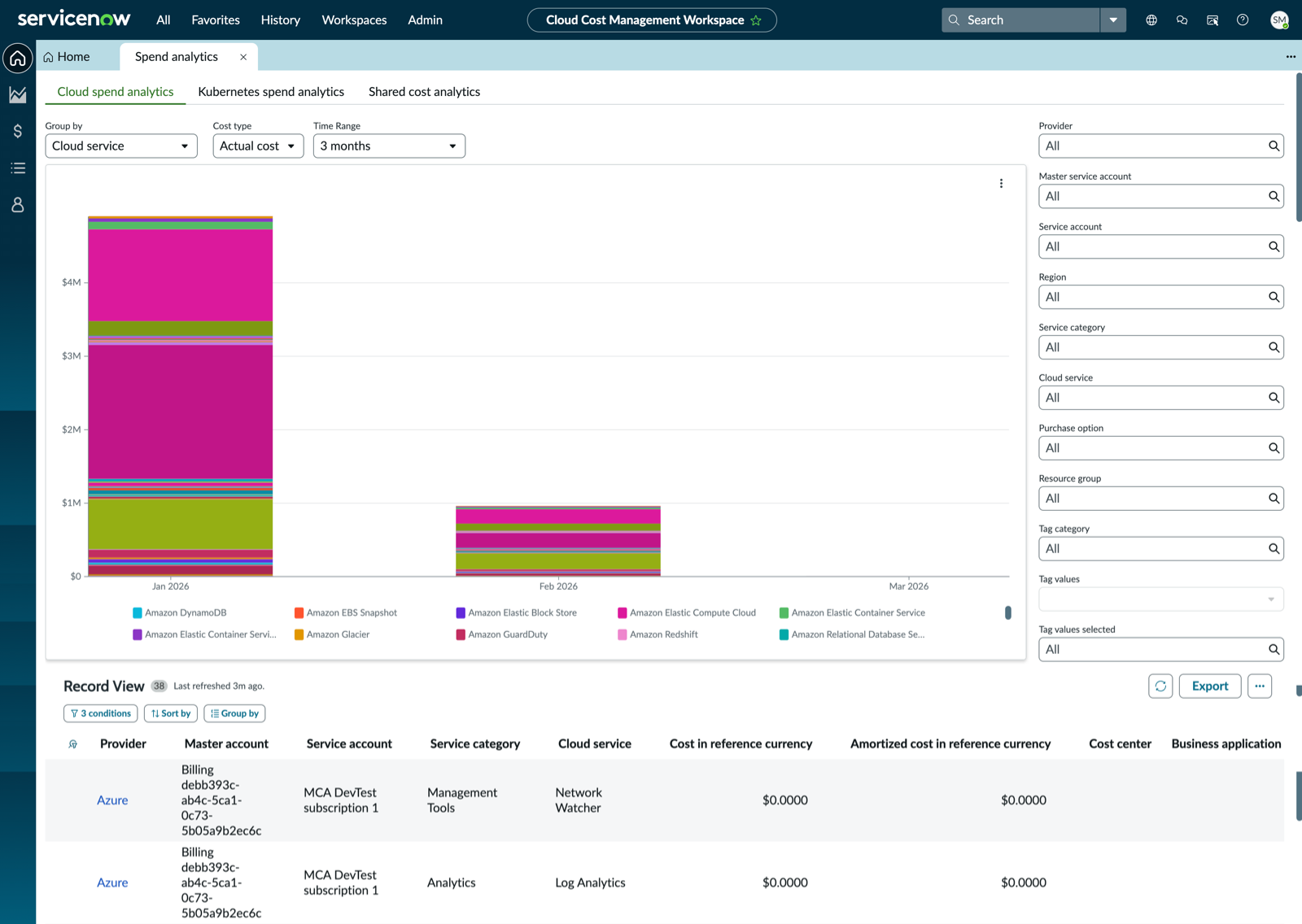
- Understand how you currently spend on cloud resources for a period that you can select in the Time range field.
- Group the cloud spend analytics by using either of the following values:
- Provider
- Purchase option
- Region
- Service account
- Service category
- Cloud service
- Resource group
- Tag category
- Sort your cloud spend results by the current month or select a time range such as 3, 6, 9, or 12 months.
- Get a better picture of your results by searching and selecting values through the following filters:
- Provider
- Master Service Account
- Service account
- Region
- Service category
- Cloud service
- Purchase option
- Resource group
- Tag categoryNote:For more information about tag categories and the list of default tag categories, see Tags and tag categories and List of default tag categories.
- Tag values
- Tag categories selected
Kubernetes spend analytics
Select the Kubernetes spend analytics tab to do the following tasks:
- Understand how you spend on Kubernetes on the cloud for a period that you can select in the Time range field.
- Group the Kubernetes spend analytics by using either of the following values:
- Kubernetes cluster
- Kubernetes namespace
- Tag category
- Select the cost type as Actual cost or Amortized cost.
- Actual cost: Each billing period, your organization pays for direct cloud services.
- Amortized cost: Your organization pays the effective cost of the upfront and monthly reservation fees spread across the billing period. The amortized cost type is described in detail on the provider site.
- Sort your Kubernetes spend results by the current month or select a time range such as 3, 6, 9, or 12 months.
- Get a better picture of your results by searching and selecting values through the following filters:
- Provider
- Master Service Account
- Service account
- Region
- Kubernetes cluster
- Kubernetes namespace
- Purchase option
- Resource group
- Tag categoryNote:For more information about tag categories and the list of default tag categories, see Tags and tag categories and List of default tag categories.
- Tag value
- Tag categories selected
- View details of cost per Kubernetes cluster and cost per Kubernetes namespace.
Shared cost analytics
Select the Shared cost analytics tab to do the following tasks: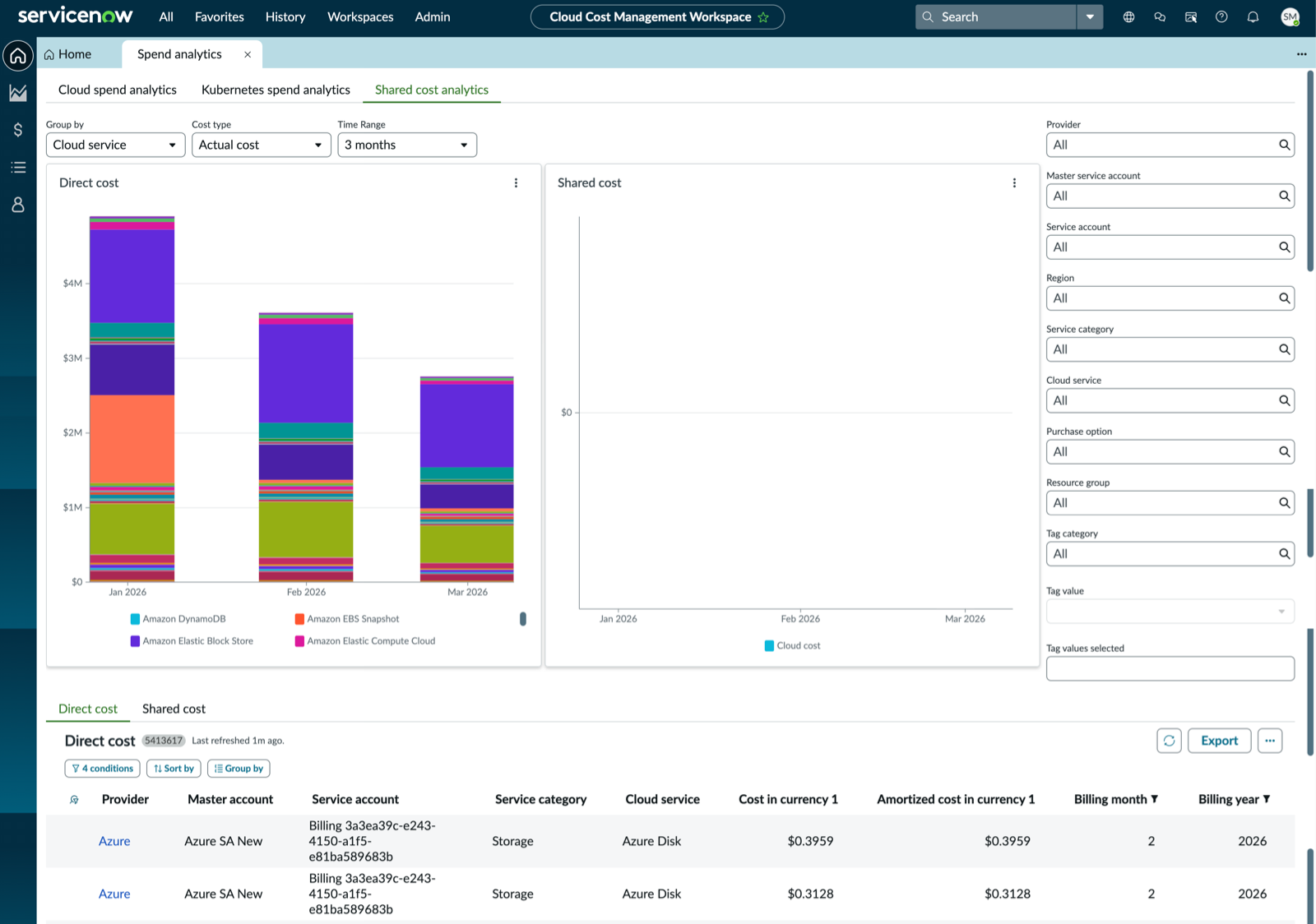
- Understand how you currently spend on shared cloud resources for a period that you can select in the Time range field.
- Group the Shared cost analytics by using either of the following values:
- Provider
- Purchase option
- Region
- Service account
- Service category
- Cloud service
- Resource group
- Tag category
- Select Cost type as Actual cost or Amortized cost.
- Actual cost: Each billing period, your organization pays for direct cloud services.
- Amortized cost: Your organization pays the effective cost of the upfront and monthly reservation fees spread across the billing period. The amortized cost type is described in detail on the provider site.
- Sort your shared resources cost results by the current month or select a time range such as 3, 6, 9, or 12 months.
- Get a better picture of your results by searching and selecting values through the following filters:
- Provider
- Master Service Account
- Service account
- Region
- Service category
- Cloud service
- Purchase option
- Resource group
- Tag categoryNote:For more information about tag categories and the list of default tag categories, see Tags and tag categories and List of default tag categories.
- Tag value
- Tag categories selected
- View details of the direct cost and shared cost of your cloud resources.