Integrating Sidebar and activity stream
For agents to post Sidebar discussions in the activity stream, Sidebar must be integrated with the activity stream and Sidebar options must display in the post filters. If the Sidebar options don’t display in the post filters, you must add them.
Before you begin
Role required: admin
Note:
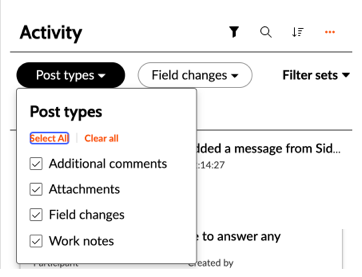
List of post types without Sidebar options:
Procedure
-
If Sidebar was automatically installed in the workspace:
- Check the sys_properties file for the record glide.ui.{table_name}_activity.fields where {table_name} is the parent record table name.
- If the sys_properties file record exists for the record table, check whether it includes Sidebar discussion and Sidebar posted message. If it
doesn't, add Sidebar discussion and Sidebar posted message at the end of the existing value.
-
If Sidebar was manually added for a record in a workspace:
- Check the sys_properties file for glide.ui.{table_name}_activity.fields where {table_name} is the parent record table name.
- If the sys_properties file record exists for the record table, check whether it includes Sidebar discussion and Sidebar posted message. If it
doesn't, add Sidebar discussion and Sidebar posted message at the end of the existing value.
- If the sys_properties file record doesn’t exist for the record table, it loads the default filters which contain Sidebar filters.
Note:List of post types with Sidebar options: