VMware NSX Advanced load balancer discovery
The ServiceNow Discovery application uses the VMware NSX Advanced load balancer discovery pattern to find VMware NSX load balancers. Discovering some of these resources may require updating to the latest version of the Discovery and Service Mapping Patterns application from the ServiceNow Store.
The pattern uses a set of REST APIs to find the load balancers. It is triggered by the NSX HTTP classifier that responds to the HTTP - Classify probe. For more information, see HTTP device discovery.
Note:
There are two patterns available. The legacy VMware NSX Load Balancer pattern is for the S series. The new VMware NSX-T Load Balancer pattern is for the T series. The functionality and collected
information remain the same.
Request apps on the Store
Visit the ServiceNow Store website to view all the available apps and for information about submitting requests to the store. For cumulative release notes information for all released apps, see the ServiceNow Store version history release notes.
Prerequisites
- Enable NSX Basic Authentication
- In VMware NSX, enable NSX Basic Authentication.
- Verify that the applications are up to date
-
- CMDB CI Class Models
- Visibility Content
- Discovery and Service Mapping Patterns
- Configure basic authentication credentials
- On the ServiceNow AI Platform, configure basic authentication credentials. The credentials must have the following API permissions:
- NSX:
- /api/4.0/edges
- /api/4.0/edges/<edge_id>loadbalancer/config
- NSX-T: /api/v1/edge-clusters
- NSX:
- Verify HTTP discovery is triggered against the NSX Main Controller IP
- The HTTP discovery is triggered only if SSH or SNMP discovery is unsuccessful.
- Create a discovery schedule
- Create the discovery schedule for VMware NSX load balancer discovery or run a quick discovery on the IP address of the NSX Main Controller. For more information about running a quick discovery, see Run a Quick Discovery.
Data collected by Discovery for VMware NSX Advanced load balancer
Discovery populates the data in the CMDB when running the VMware NSX Advanced load balancer patterns.
| Field | Description |
|---|---|
| Name [name] | Edge name. |
| Object ID [object_id] | Edge ID. |
| IP Address [ip_address] | IP address of the NSX Main Controller. |
| Operational status [operational_status] | Load balancer status: Active or inactive. |
| Field | Description |
|---|---|
| Name [name] | Virtual server name. |
| IP Address [ip_address] | Virtual server IP address. |
| Object ID [object_id] | Virtual server object ID. |
| Port [port] | Virtual server port with which to communicate. |
| Listener Protocol [listener_protocol] | Listener protocol. For example: HTTP, HTTPS. |
| Field | Description |
|---|---|
| Name [name] | Pool name. |
| Object ID [object_id] | Pool object ID. |
| Field | Description |
|---|---|
| Name [name] | Pool member name. |
| IP Address [ip_address] | Pool member IP address. |
| Object ID [object_id] | Pool member object ID. |
| Service port [service_port] | Pool member port with which to communicate. |
| Field | Description |
|---|---|
| Name [name] | Monitor name. |
| Object ID [object_id] | Monitor object ID. |
| Timeout in seconds [timeout_sec] | Time in seconds to wait for a response. |
| Interval in seconds [check_interval_sec] | Interval in seconds after which the monitor sends the request again. |
| Monitor type protocol [monitor_type] | Monitor type. For example: HTTP, HTTPS, TCP. |
| Request path [request_path] | Path where the monitor sends the request. |
| Max retries [max_retries] | The maximum number of times the resource is tested before it is declared "Down". |
The Dependency Views map shows all discovered load balancer CIs and the relationships
between them.
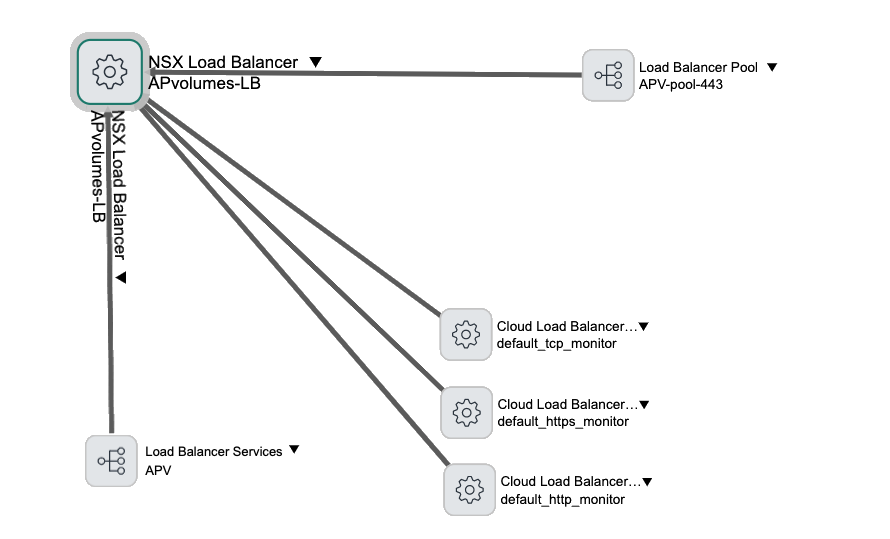
CI relationships
Discovery creates these relationships to support the VMware NSX load balancer discovery.
| CI | Relationship | CI |
|---|---|---|
| Load Balancer Service [cmdb_ci_lb_service] | Runs on::Runs | NSX Load Balancer [cmdb_ci_nsx_lb] |
| Load Balancer Service [cmdb_ci_lb_service] | Uses::Used by | Load Balancer Pool [cmdb_ci_lb_pool] |
| Load Balancer Pool [cmdb_ci_lb_pool] | Hosted on::Hosts | NSX Load Balancer [cmdb_ci_nsx_lb] |
| Load Balancer Pool [cmdb_ci_lb_pool] | Owns::Owned by | Load Balancer Pool Member [cmdb_ci_lb_pool_member] |
| Cloud Load Balancer Health Service [cmdb_ci_lb_health_service] | Hosted on::Hosts | NSX Load Balancer [cmdb_ci_nsx_lb] |
| Cloud Load Balancer Health Service [cmdb_ci_lb_health_service] | Used by::Uses | Load Balancer Pool [cmdb_ci_lb_pool] |
Troubleshooting
If
the mapping process does not proceed as you expected, follow the following suggestions.
| Symptom | Cause | Solution |
|---|---|---|
| Discovery fails. The discovery message contains the information about an error caused by the REST timeout. | There are many CIs sending the REST call response in the deployment. The MID Server cannot process the REST call response without exceeding the time limit controlled by the mid.sa.cloud.request_timeout parameter. | By default, the mid.sa.cloud.request_timeout parameter is set to 30000 milliseconds. Increase the value of this parameter on the relevant MID Server and run discovery again. Note: If the Configuration Parameters related list for the relevant MID Server does not show this parameter, you may need to add it. |
| Pattern Designer fails during a debug session. The Pattern Designer message contains information about an error caused by a timeout. | The Pattern Designer fails because of a timeout during pattern debugging (and not during discovery). | By default, the sa.debugger.max_timeoutparameter is set to 240 seconds. Increase the value of this parameter on the relevant MID Server. |