카탈로그 항목 렌더링 유형
렌더링 유형은 카탈로그 항목의 양식을 요청자에게 렌더링할 수 있는 방법을 결정합니다. 예를 들어 가상 에이전트 카탈로그 항목은 대화, 창 또는 팝업으로 렌더링할 수 있습니다.
대화형 에이전틱 렌더링 유형을 사용하는 카탈로그 항목 요청
대화-에이전틱 렌더링 유형은 에이전틱 AI를 사용하여 사용자가 대화를 통한 안내식 자연어 채팅을 통해 카탈로그 항목 요청을 제출할 수 있도록 합니다. Now Assist는 모든 필드를 한 번에 표시하는 대신 단계별로 사용자 정보를 수집합니다.
웹 렌더 유형을 사용하는 카탈로그 항목 요청
웹 렌더링 유형은 카탈로그 항목에 대해 가장 널리 사용되는 기본이자 렌더링 모드입니다. 카탈로그 항목이 이 렌더링 유형으로 설정되면 해당 요청 양식이 포털 또는 Now Platform UI 내에서 표준 웹 페이지로 렌더링됩니다.
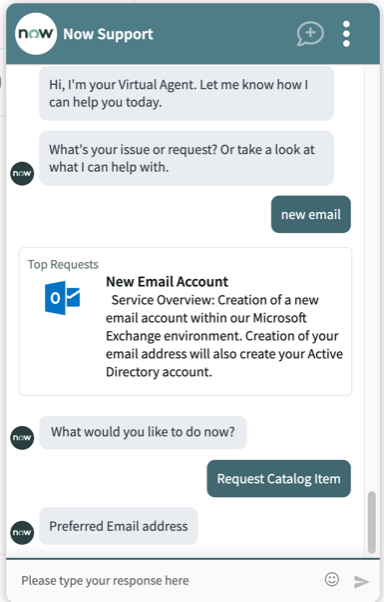
대화 렌더링 유형을 사용하는 카탈로그 항목 요청
사용자는 가상 에이전트의 대화 모드에서 (라인의 질문에 응답하여) 요청을 제출할 수 있습니다.
팝업 렌더링 유형을 사용하는 카탈로그 항목 요청
사용자는 대화형이 아닌 항목에 대한 팝업으로 카탈로그 항목 요청을 제출할 수 있습니다. 가상 에이전트는 팝업에서 사용자가 새 탭으로 이동하지 않고 팝업에서 요청을 제출할 수 있는 링크를 제공합니다. 비대화형 카탈로그 항목은 사용자 지정, 레이블이 있는 사용자 지정 또는 UI 페이지 변수가 없는 경우에만 팝업으로 렌더링할 수 있습니다.
주:
가상 에이전트 대화를 팝업으로 렌더링하지 않으려면 속성을 예로 glide.sc.va.render_type.legacy 설정하여 구성된 포털의 모든 비대화형 카탈로그 항목을 새 탭으로 렌더링합니다.
창 렌더 유형을 사용하는 카탈로그 항목 요청
사용자는 창에서 카탈로그 항목 요청을 제출할 수 있습니다. Virtual Agent는 창에서 속성에 정의된 sn_itsm_va.com.snc.itsm.virtualagent.portal_url Service Portal에서 사용자가 요청을 제출할 수 있는 링크를 제공합니다. 비대화 항목은 사용자 지정, 레이블이 있는 사용자 지정 또는 UI 페이지 변수가 있는 경우 창으로 렌더링됩니다.
카탈로그 항목은 다음 유형인 경우 창으로 렌더링됩니다.
- 콘텐츠 항목
- 주문 가이드
- 마법사 시작 관리자
- 표준 변경 템플릿