Create a reference field interactive filter
A reference field interactive filter allows users to filter report widgets based on the value of a reference field.
Before you begin
Role required: hp_publisher_admin and report_admin. The hp_publisher_admin role exists only for managing interactive filters in Core UI. By default, it contains the role analytics_filter_admin for managing Core UI filters that are migrated to Platform Analytics experience.
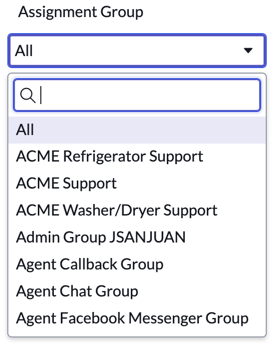
When a user selects
All, they do not see a report with all filter options
applied, they see the unfiltered report. This
example of reference filter provides filter options from the Assignment Group field
on the Group [sys_user_group] table.
Note:
If the interactive filter has a default value or specifies the last selected value, non-responsive dashboards do not apply this value automatically. This feature is only available on Responsive dashboards.
Procedure
-
In the Filter based on list, select Reference.
- Optional:
Add a related list condition.
You can add a condition to your filter based on the records in one related table.
-
Click the link labeled Greater than or Equal to
1.
From the list, select the number of records on the source table that must be related to a record on the target table.The options are:
- Greater than or Equal to
- Greater than
- Less than or Equal to
- Less than
- Equal to
- None
- Between
-
Click the link labeled Greater than or Equal to
1.
What to do next
Note:
A filter may be converted from the Check boxes control type to the
Select Multiple Input control type for performance reasons.
- After you create the filter, add it to a dashboard.
- On the dashboard, select the Edit widget icon (
 ) on each visualization on the dashboard that should follow the filter and select Follow interactive filter.