Receive AI recommendations of actions to take based on your current exploration in AI Data Explorer.
Before you begin
To use this feature, the exploration action recommendation skill must be turned on.
Role required: now_assist_explorer_user
Procedure
-
Launch AI Data Explorer.
-
Open an exploration that already has generated insights.
-
For best results, set an exploration goal.
-
Perform one of the following actions:
- In the border of the exploration, press the Actions recommendation button.

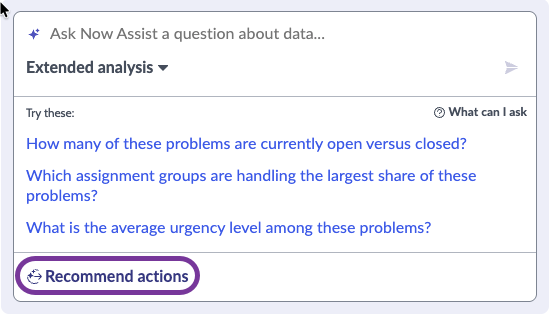
- In the prompt window, select Recommend actions.
-
Read the recommendations.
-
If you need more details about a recommendation, expand the three-dot menu on that recommendation and select Show details.
-
If you disagree with a recommendation, you can expand the three-dot menu on that recommendation and delete it.
-
To hide or show the recommendations, press the Actions recommendation button.
When the recommendations are hidden, you can also show them with the View recommended actions control, which replaces the Recommend actions control in the prompt
window.
-
Follow the recommendations you agree with.
-
When you have addressed the recommendations, you can press the Regenerate button after the recommendations to generate new recommendations.