The Discovery and Service Mapping Patterns application uses the Next Generation Fortinet Network Firewall pattern to find Fortinet firewalls through a series of SNMP calls. Discovering some of these resources may require updating to the latest version of the Discovery and Service Mapping Patterns application from the ServiceNow Store.
The Next Generation Fortinet Network Firewall pattern uses a set of SNMP calls to find the Fortinet firewalls. Discovery uses the pattern to run horizontal discovery.
Note: Only the REST-based Fortinet firewall discovery method finds FortiGate VDOMs. The SNMP-based Fortinet firewall discovery method doesn't discover them. For information on REST-based
Fortinet firewall and FortiGate Virtual Domains (VDOMs) discovery, see
Fortinet firewall and FortiGate VDOM REST-based discovery.
Fortinet Firewall data model
The Next Generation Fortinet Network Firewall pattern introduces the following CI classes that extend an existing CMDB class.
Table 1. CI classes introduced by this pattern
| CI class |
Extends from |
| Fortinet Firewall Cluster [cmdb_ci_firewall_cluster_fortinet] |
Firewall Cluster [cmdb_ci_firewall_cluster] |
| Fortinet Firewall Device [cmdb_ci_firewall_device_fortinet] |
Firewall Device [cmdb_ci_firewall_device] |
Prerequisites
- Verify the applications are up to date
-
- Discovery and Service Mapping Patterns
- CMDB CI Class Models
- Ensure SNMP access
- Ensure that your Fortinet firewall device has SNMP access.
- Configure SNMP credentials
- On the ServiceNow instance, configure SNMP credentials. For more information, see SNMP credentials.
- Add SNMP system OID record to ServiceNow instance
- Add the SNMP system OID record for the Fortinet device to the ServiceNow instance. Update the following:
- Classifier: Fortinet Firewall
- Class: Fortinet Firewall Device
- Run a horizontal discovery
- For more information, see Running discoveries in your network.
Data collected by Discovery during horizontal discovery
Discovery populates the data in the CMDB when running the Next Generation Fortinet Network Firewall Pattern.
Table 2. Fortinet Firewall Cluster [cmdb_ci_firewall_cluster_fortinet]
| Field |
Description |
| Name [name] |
Hostname. |
| Fully qualified domain name [fqdn] |
Fully qualified domain name. |
| IP address [ip_address] |
IP address. |
| Manufacturer [manufacturer] |
Device manufacturer. |
| Description [short_description] |
Short description of the Fortinet firewall cluster. |
| Model Number [model_number] |
Device model number. |
| Hardware Operating System [hardware_os] |
OS running on the hardware. |
| Hardware OS Version [hardware_os_version] |
OS version running on the hardware. |
Table 3. Fortinet Firewall Device [cmdb_ci_firewall_device_fortinet]
| Field |
Description |
| Name [name] |
Hostname. |
| Serial Number [serial_number] |
Serial number of the device. |
| Fully qualified domain name [fqdn] |
Fully qualified domain name. |
| Operational Status [operational_status] |
Indicates if the device is in active state. |
| IP address [ip_address] |
IP address. |
| Manufacturer [manufacturer] |
Device manufacturer. |
| Description [short_description] |
Short description of the device. |
| Model Number [model_number] |
Device model number. |
| Firmware [firmware_version] |
Firmware version. |
| Hardware Operating System [hardware_os] |
OS running on the hardware. |
| Hardware OS Version [hardware_os_version] |
OS version running on the hardware. |
Table 4. IP Address [cmdb_ci_ip_address]
| Field |
Description |
| IP Address [ip_address] |
IP address of the Fortinet firewall. |
| Netmask [netmask] |
Netmask of the Fortinet firewall. |
| Nic [nic] |
References the Network Adapter [cmdb_ci_network_adapter] table. |
Table 5. Network Adapter [cmdb_ci_network_adapter]
| Field |
Description |
| IP Address [ip_address] |
IP address of the network adapter. |
| Netmask [netmask] |
Netmask of the network adapter. |
| Alias [alias] |
User-assigned name for the network adapter. |
| MAC Address [mac_address] |
MAC address of the network adapter. |
| Name [name] |
Name of the network adapter. |
| Configuration Item [cmdb_ci] |
References the Fortinet Firewall Device [cmdb_ci_firewall_device_fortinet] table. |
Table 6. DNS Name [cmdb_ci_dns_name]
| Field |
Description |
| Name [name] |
Name of the Domain Name System (DNS). |
| IP Address [ip_address] |
IP address of the DNS. |
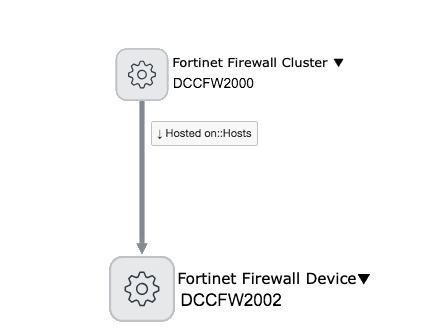
This
Dependency Views map on the
Fortinet Firewall Device CI shows the
Fortinet Firewall Cluster to which it belongs.
CI relationships
The Next Generation Fortinet Network Firewall pattern creates the following relationships and references to support Fortinet firewall discovery. References link to records in other tables and don't appear in the CI Relationship [cmdb_rel_ci] table.
Table 7. CI relationships
| CI |
Relationship |
CI |
| Fortinet Firewall Cluster [cmdb_ci_firewall_cluster_fortinet] |
Hosted on::Hosts |
Fortinet Firewall Device [cmdb_ci_firewall_device_fortinet] |
| Fortinet Firewall Device [cmdb_ci_firewall_device_fortinet] |
Owns::Owned by |
IP Address [cmdb_ci_ip_address] |
| Fortinet Firewall Device [cmdb_ci_firewall_device_fortinet] |
Owns::Owned by |
Network Adapter [cmdb_ci_network_adapter] |
| Fortinet Firewall Device [cmdb_ci_firewall_device_fortinet] |
Uses::Used by |
Router Interface [dscy_router_interface] |
| Network Adapter [cmdb_ci_network_adapter] |
Owns::Owned by |
IP Address [cmdb_ci_ip_address] |
Table 8. CI references
| CI |
Field |
Referenced CI |
| Serial Number [cmdb_serial_number] |
Configuration item [configuration_item] |
Fortinet Firewall Device [cmdb_ci_firewall_device_fortinet] |
| Network Adapter [cmdb_ci_network_adapter] |
Configuration Item [cmdb_ci] |
Fortinet Firewall Device [cmdb_ci_firewall_device_fortinet] |
| Router Interface [dscy_router_interface] |
Configuration Item [cmdb_ci] |
Fortinet Firewall Device [cmdb_ci_firewall_device_fortinet] |
| IP Address [cmdb_ci_ip_address] |
Nic [nic] |
Network Adapter [cmdb_ci_network_adapter] |