Configure the Node status conditions and parameters for the selected node configuration table. You can then customize the map display by assigning specific colors and icons to the nodes that meet certain
conditions.
Procedure
-
Navigate to and open the desired Main node configuration from the list.
-
Open the desired Nexus map configuration record from the Nexus map configurations related list.
-
Open the desired Node configuration record from the Node configurations related list.
-
In the Node status configurations related list, select New.
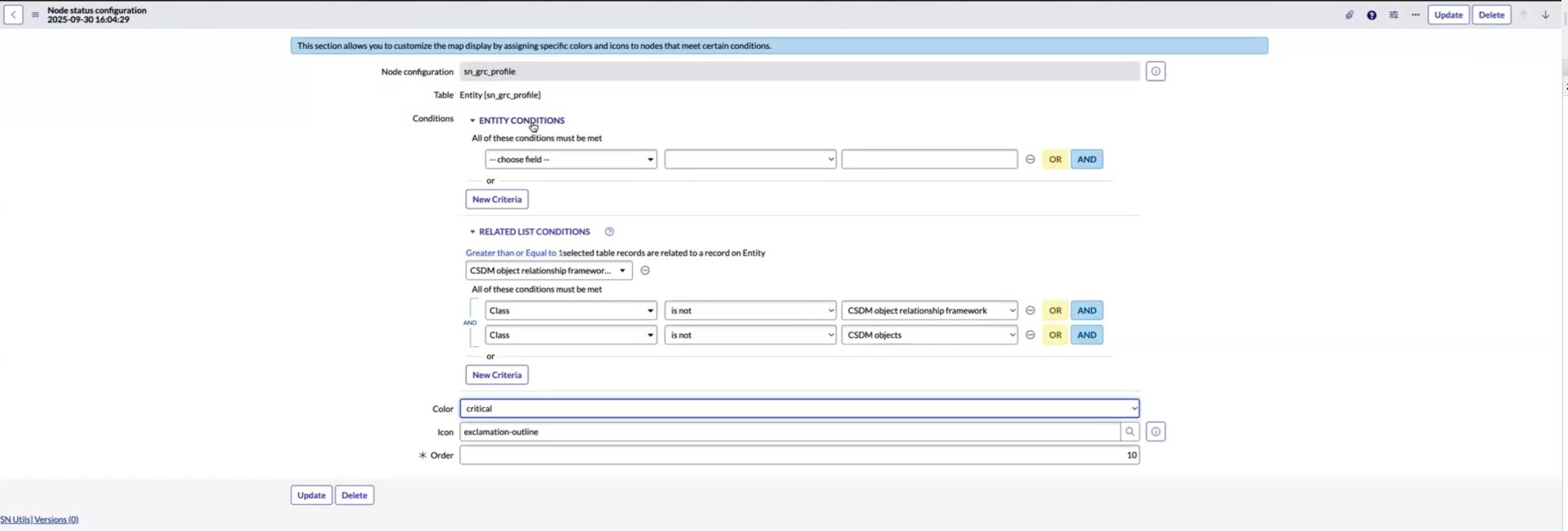
You can customize the map display such as assigning specific colors and icons to nodes that meet certain conditions by configuring the Node status configuration record.
For more information on the fields, see Node status configuration form.
The Node status configuration record is displayed in which the Node configuration and Table are auto-populated.
-
Add the conditions that must be satisfied for the node status configuration in the Conditions field.
-
Select the color for the node status in the Color field.
-
Select the icon for the node status in the Icon field.
The order for the node status is auto-selected.
A sample configuration is shown in the example.
-
To submit the details of the Node status configuration, select Submit.
The Node status configuration record is displayed in the Node status configurations related list.